

🏗️ SAP Solution Architect: the complete guide
What a solution architect really does, how SAP Activate runs end to end, and how implementation, rollout, support, upgrade and migration projects differ. Infographics, interview questions and a scored test included.
An SAP Solution Architect turns business goals into a working SAP landscape: which processes run in standard S/4HANA, what is extended on SAP BTP, how systems integrate, how data moves, and how the solution stays upgradeable. It is the natural next step for experienced functional consultants in modules such as PS, SD, MM, EAM, Service and HCM.
📝 Jump to the scored architect test
What does an SAP solution architect do?
The architect owns the end-to-end solution design across modules and technologies and is accountable for it being fit for purpose, integrated, secure and upgradeable.
🎯 Business alignment
- Translate strategy into a process and capability map
- Define scope, value drivers and KPIs
- Run design authority and decision logs
🧭 Solution design
- Fit-to-standard and gap decisions
- Enterprise structure across FI, CO, logistics and HR
- Cross-module integration (O2C, P2P, Plan-to-Produce, Hire-to-Retire, Service-to-Cash)
🔌 Integration & extensibility
- SAP Integration Suite, APIs and events
- Key-user, developer and side-by-side (BTP) extensions
- Clean core governance
🗄️ Data & migration
- Data migration strategy and tooling
- Master data governance (MDG)
- Archiving and data volume management
🛡️ Non-functional
- Security, roles and GRC
- Performance, availability and DR
- Landscape, transports and release strategy
🤝 Leadership
- Guide functional and technical leads
- Estimate effort and identify risks
- Present options and trade-offs to executives
SAP Activate: the end-to-end implementation cycle
SAP Activate is SAP’s methodology for S/4HANA and cloud projects. It combines SAP Best Practices content, guided configuration and an agile, iterative delivery approach, with a quality gate at the end of every phase.
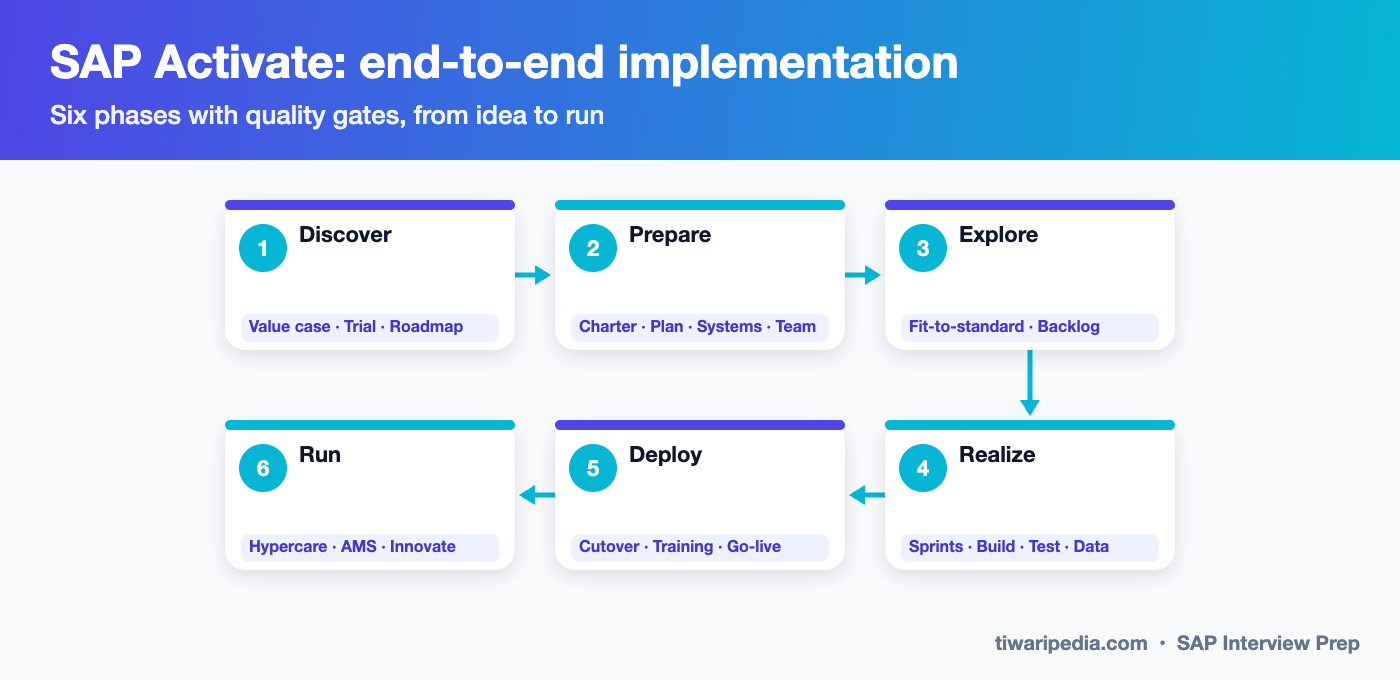
| Phase | Key activities | Main deliverables | Architect role |
|---|---|---|---|
| 1. Discover | Identify value and use cases, explore a trial system, assess readiness | Business case, solution roadmap, scope options | Shape the target architecture and deployment option (public, private, RISE) |
| 2. Prepare | Project initiation, governance, plan, provisioning of starter or sandbox systems, team onboarding | Project charter, plan, RACI, system landscape, initial backlog | Define landscape, integration and data migration strategy, design principles |
| 3. Explore | Fit-to-standard workshops using best-practice processes, capture delta requirements | Fit-gap list, delta design documents, prioritised backlog, WRICEF inventory | Approve gaps, decide extension approach, hold design authority |
| 4. Realize | Configure and build in sprints, unit and string tests, integration test cycles, data migration loads, UAT | Configured solution, tested WRICEF objects, test results, migrated test data | Ensure integrated design, resolve cross-team issues, review non-functional quality |
| 5. Deploy | Cutover rehearsals, end-user training, production cutover, go-live, hypercare | Cutover plan, trained users, productive system, hypercare log | Go/no-go decision support, cutover risk management |
| 6. Run | Operate, monitor and continuously improve, adopt new releases | AMS model, release calendar, improvement backlog | Roadmap for innovation, clean core and upgrades |
Workstreams across all phases: project management, application design and configuration, extensibility, integration, data management, testing, technical architecture and infrastructure, organisational change management, and operations.
Types of SAP projects
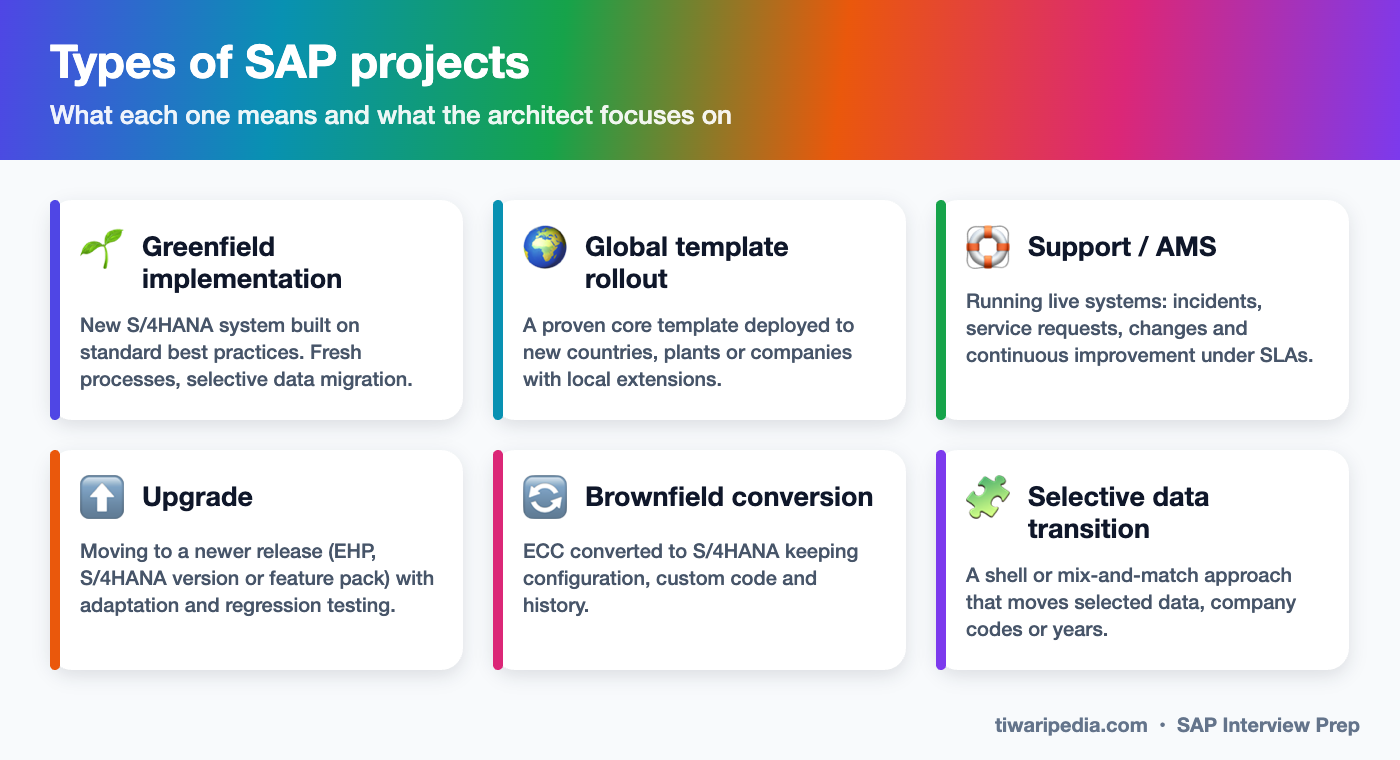
Interviewers often ask, “What kinds of projects have you done, and how were they different?” Here is how each type works and what the architect focuses on.
1. Implementation (greenfield)
A new SAP system for a company that is new to SAP or wants to start fresh with S/4HANA. You re-design processes on SAP best practices and migrate only the data you need, usually master data, open items and balances.
- Discover & prepare
Business case
Confirm scope, deployment model (public cloud, private cloud or on-premise), timeline and team. - Fit-to-standard
Explore
Show standard processes in a best-practice system and record only real gaps. - Design deltas
WRICEF
Workflows, reports, interfaces, conversions, enhancements and forms are specified and estimated. - Build & test in sprints
Realize
Configuration and development in sprints, then integration testing (SIT) and user acceptance testing (UAT). - Migrate data
Migration Cockpit
Multiple mock loads with reconciliation before the final production load. - Cutover & go-live
Deploy
Freeze, final loads, validation, go-live and hypercare, then handover to support.
2. Global template rollout
A rollout deploys a proven global template (common processes, org structure principles, master data standards) to a new country, company or plant. The challenge is balancing global standardisation with local legal and business needs.
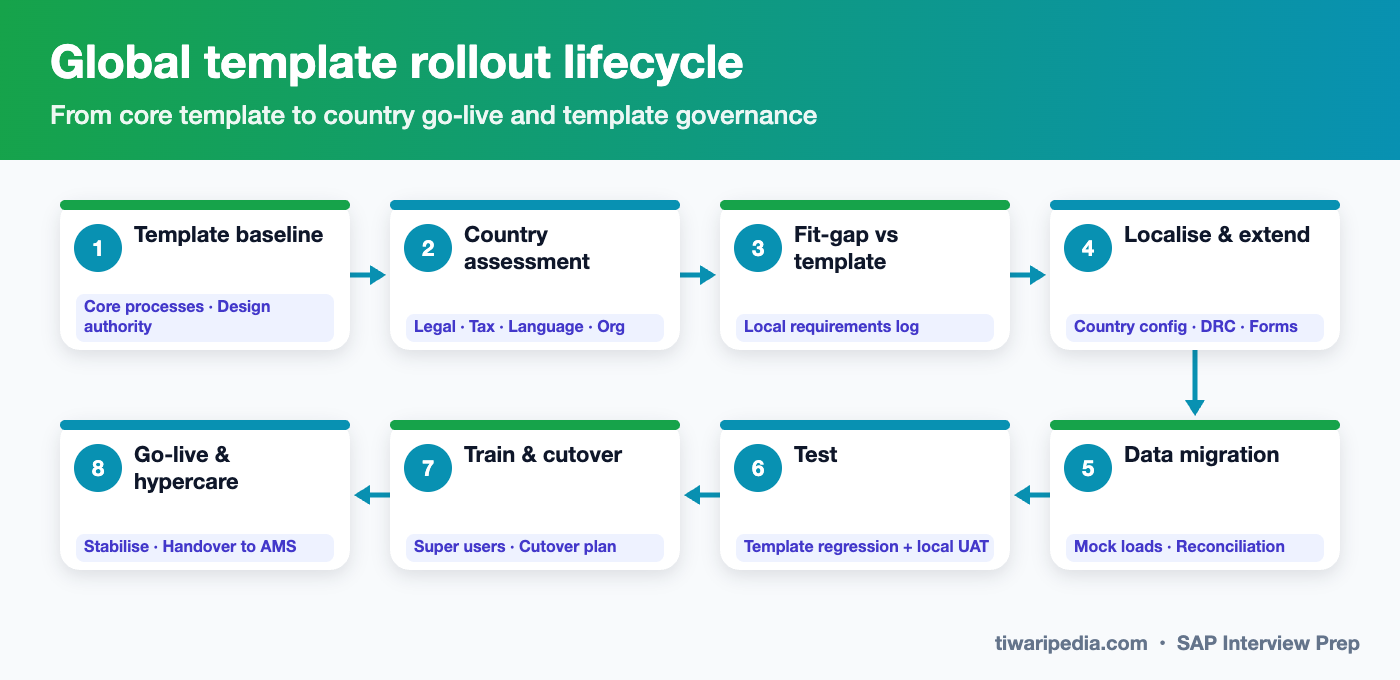
- Core vs local: keep a clear list of what is global (locked) and what can be localised (tax, legal reports, e-invoicing, statutory payroll, language, forms).
- Design authority: any change to the template goes through governance so that all countries benefit and regression is controlled.
- Localisation: country versions, SAP Document and Reporting Compliance (DRC) for e-invoicing and statutory reports, tax engines, and local banks.
- Testing: template regression testing for existing countries plus local UAT for the new country.
- Waves: group countries by region, size or complexity, and reuse cutover playbooks between waves.
3. Support / Application Management Services (AMS)
Support projects keep live SAP systems running and improving. Work is driven by tickets and measured by SLAs, usually following ITIL practices.
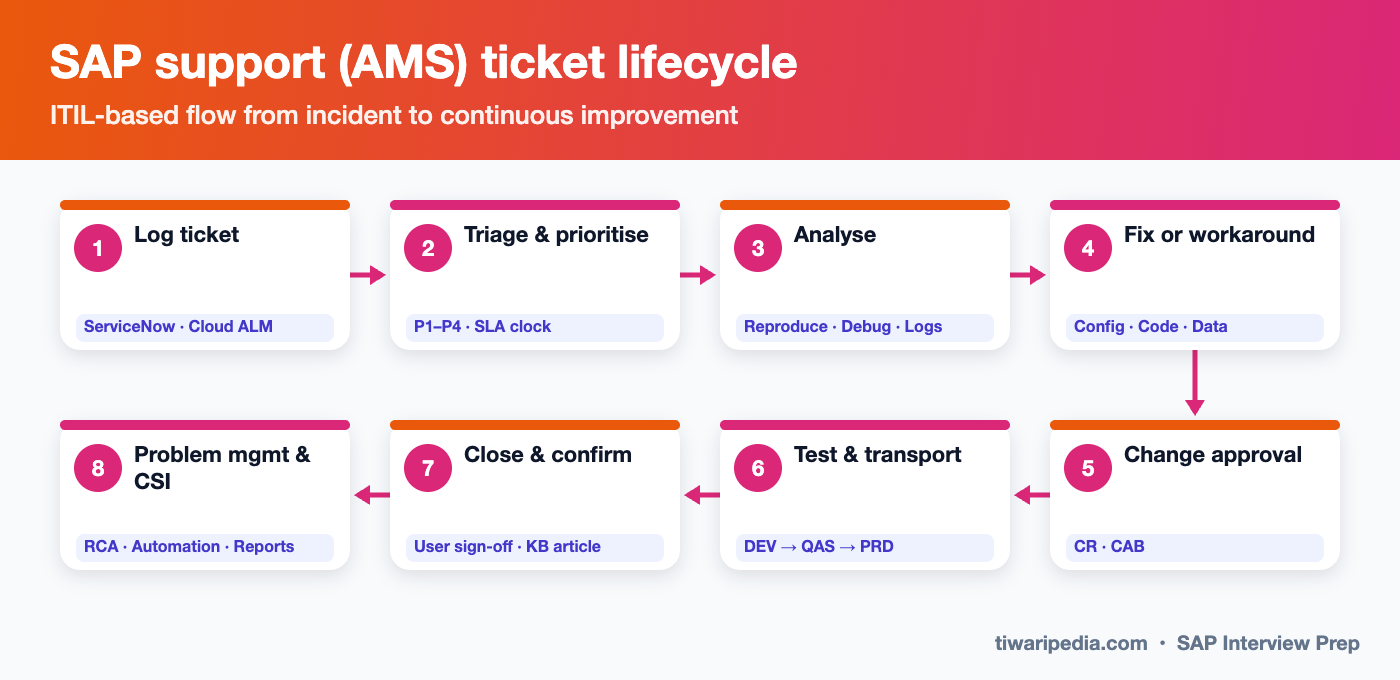
| Ticket type | What it is | Example |
|---|---|---|
| Incident | Something is broken or not working as designed | Invoice posting fails with an account determination error |
| Service request | A standard request that needs no design | New user role, master data change, password reset |
| Change request (CR) | A new requirement or enhancement | New field on the sales order, new report |
| Problem | The root cause behind repeated incidents | Recurring settlement failures at month end |
| Priority | Meaning | Typical response / resolution |
|---|---|---|
| P1 Critical | Business stopped, no workaround | Response within 15–30 min, resolution within 4 hours |
| P2 High | Major impact, workaround is difficult | Response 1 hour, resolution 1 business day |
| P3 Medium | Limited impact, workaround exists | Response 4 hours, resolution 3–5 days |
| P4 Low | Minor issue or question | Response 1 day, resolution as planned |
SLA values vary by contract. These are typical ranges. Architects in AMS focus on root cause analysis, reducing ticket volumes through automation and self-service, release management, and a roadmap of improvements. Tools include ServiceNow, SAP Solution Manager and SAP Cloud ALM.
4. Upgrade & S/4HANA conversion
An upgrade moves an existing system to a newer release: an ECC enhancement package, a newer S/4HANA version or a feature pack. A system conversion (brownfield) moves ECC to S/4HANA, keeping configuration and history. Both follow a similar technical cycle.
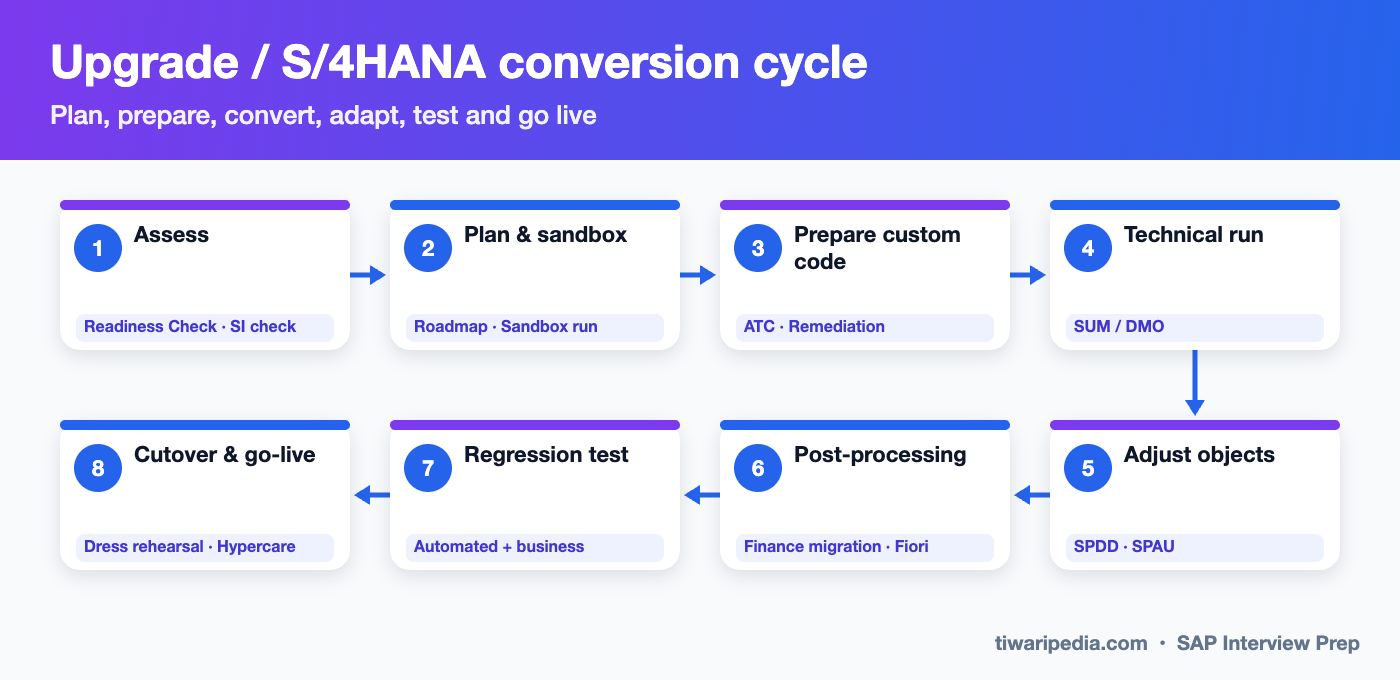
- Assess: SAP Readiness Check and the Simplification Item Check show mandatory changes, add-on compatibility and data issues.
- Custom code: ABAP Test Cockpit (ATC) checks identify code that must be adapted, and unused code is retired.
- Technical run: the Software Update Manager (SUM), with Database Migration Option (DMO) when moving to SAP HANA.
- Adjustments: SPDD (dictionary) and SPAU (repository objects) reconcile modified SAP objects.
- Post-processing: finance data migration into the Universal Journal, Business Partner conversion (CVI), Fiori activation.
- Regression testing: automated tests plus business testing of critical end-to-end processes, then rehearsed cutover and go-live.
Greenfield vs brownfield vs selective data transition
| Aspect | Greenfield (new implementation) | Brownfield (system conversion) | Selective data transition |
|---|---|---|---|
| What moves | Selected master data, open items, balances | Everything: configuration, custom code, history | Chosen company codes, years, processes |
| Process redesign | Full reset to best practices | Limited, mostly technical | Mix: redesign some areas, keep others |
| Effort and risk | Higher business change, clean result | Faster and less disruptive, carries legacy complexity | Highest planning complexity, needs specialist tools or partners |
| Best for | Heavily customised or outdated ECC, mergers, new businesses | Well-designed ECC with valuable history, tight timelines | Carve-outs, consolidations, phased transformation |
Architecture principles every SAP architect should know
🧼 Clean core
Keep S/4HANA close to standard. Extend through released APIs, key-user tools and BTP side-by-side apps so that upgrades stay easy.
🔌 Integration first
Use SAP Integration Suite, standard APIs and business events. Avoid point-to-point custom interfaces.
☁️ Deployment choice
Public cloud (standardised, quarterly upgrades), private cloud via RISE with SAP (more flexibility) or on-premise.
🗃️ Data as an asset
Master data governance, data quality rules and a single source of truth for business partners, materials and assets.
🔒 Security by design
Role design, segregation of duties (GRC), identity management and data privacy.
📊 Embedded analytics
CDS-based reporting in S/4HANA, with SAP Datasphere and SAP Analytics Cloud for enterprise analytics.
Solution architect interview questions & answers
🟢 Fundamentals
What are the phases of SAP Activate? Beginner
What is fit-to-standard? Beginner
What does WRICEF stand for? Beginner
What is the difference between an implementation, a rollout and a support project? Beginner
🟡 Intermediate
What is clean core and why does it matter? Intermediate
Explain greenfield vs brownfield vs selective data transition. Intermediate
What tools do you use for an S/4HANA conversion? Intermediate
How do you manage a global template? Intermediate
What is RISE with SAP? Intermediate
🔴 Scenario & leadership
A business insists on a heavy customisation in the sales order. How do you handle it as an architect? Scenario
How would you plan a cutover for a go-live? Scenario
How do you reduce ticket volume in an AMS project? Scenario
How do you decide where to build an extension: in S/4HANA or on BTP? Scenario
How would you design integration for a landscape with S/4HANA, SuccessFactors, Ariba and a third-party CRM? Scenario
What risks do you watch in an upgrade project? Scenario
How do you handle conflicting requirements between two countries in a rollout? Scenario
Test yourself: scored solution architect quiz
- Tell stories: the problem, the options you considered, your decision and the result.
- Draw the landscape: S/4HANA, BTP, Integration Suite, cloud apps and third-party systems.
- Always mention trade-offs: cost, risk, time, upgradeability.
- Use real numbers: users, countries, interfaces, data volumes, go-live dates.
- Show leadership: design authority, mentoring, managing scope and stakeholders.
Keep preparing: 🎯 SAP Interview Prep hub & combined mock test · All SAP interview guides