

📐 SAP PS (Project Systems) interview guide
From project structuring to period-end settlement: the full PS lifecycle with T-codes, design choices and the scenario questions senior panels ask.
SAP Project Systems (PS) plans, budgets, executes and controls projects of any size: capital investments, engineer-to-order manufacturing, construction, R&D and customer service projects. PS sits at the crossroads of Finance, Logistics and Sales, which is why PS consultants who understand integration are highly valued.
What is SAP PS?
PS gives you two complementary structures:
- Work Breakdown Structure (WBS): the hierarchical, cost-oriented view of the project. Costs, budgets and revenues are planned and collected on WBS elements.
- Networks and activities: the time- and resource-oriented view. They hold dates, dependencies, internal labour, external services and materials.
Common project types include internal investment (capex) projects settled to assets, overhead/cost projects settled to cost centres, and customer projects with billing plans, results analysis and revenue recognition.
End-to-end process: Project lifecycle (structure to settlement)
Interviewers usually ask you to explain the PS lifecycle end to end, then dig into budgeting and settlement. Follow this sequence.
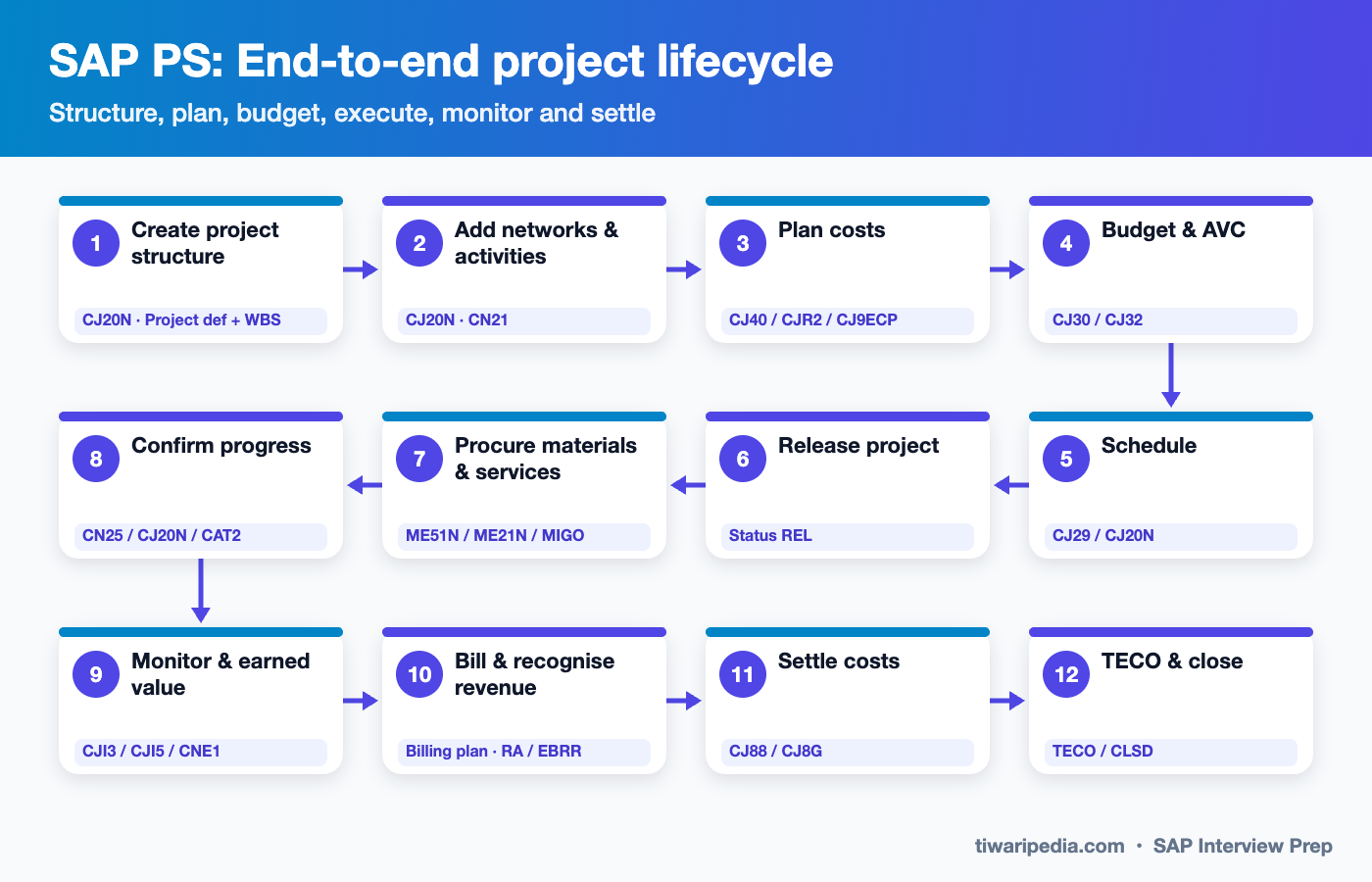
- Create project structure
CJ20N · Project def + WBS
Create the project definition from a project profile, then build the WBS hierarchy with planning, account assignment and billing indicators. Templates (CJ91) speed this up. - Add networks & activities
CJ20N · CN21
Add networks with internal, external, general-cost and service activities, relationships (FS, SS, FF, SF) and material components. - Plan costs
CJ40 / CJR2 / CJ9ECP
Plan costs structure-oriented on WBS, by cost element, through Easy Cost Planning, or automatically from network activities. - Budget & AVC
CJ30 / CJ32
Allocate the original budget, release it, and activate availability control so overspending triggers a warning or error. - Schedule
CJ29 / CJ20N
Forward or backward scheduling calculates earliest and latest dates and float. Milestones mark key events. - Release project
Status REL
Release allows actual postings, purchase requisitions and reservations. System statuses and user statuses control business transactions. - Procure materials & services
ME51N / ME21N / MIGO
External activities and non-stock components create PRs automatically. Stock items create reservations. Project stock (Q) can be used. - Confirm progress
CN25 / CJ20N / CAT2
Teams confirm hours and percentage complete on activities. Labour cost posts through the activity type rate. - Monitor & earned value
CJI3 / CJI5 / CNE1
Track actuals, commitments, plan vs actual and earned value (BCWS, BCWP, ACWP) through the information system and progress analysis. - Bill & recognise revenue
Billing plan · RA / EBRR
For customer projects, milestone billing runs via SD. Results analysis (KKA2) or event-based revenue recognition in S/4HANA calculates WIP and POC. - Settle costs
CJ88 / CJ8G
Period-end settlement moves costs to receivers: an asset under construction, the final asset, a cost centre or profitability analysis. - TECO & close
TECO / CLSD
Technically complete the project, run final settlement and capitalisation, then close it to block further postings.
Organizational structure & master data
Organizational structure
Controlling area & company code
Every project is assigned to a controlling area and company code. A single project can span company codes when cross-company postings are allowed.
Profit centre, business area, plant
Defaulted from the project definition to the WBS elements and networks for reporting and logistics.
Project profile (OPSA)
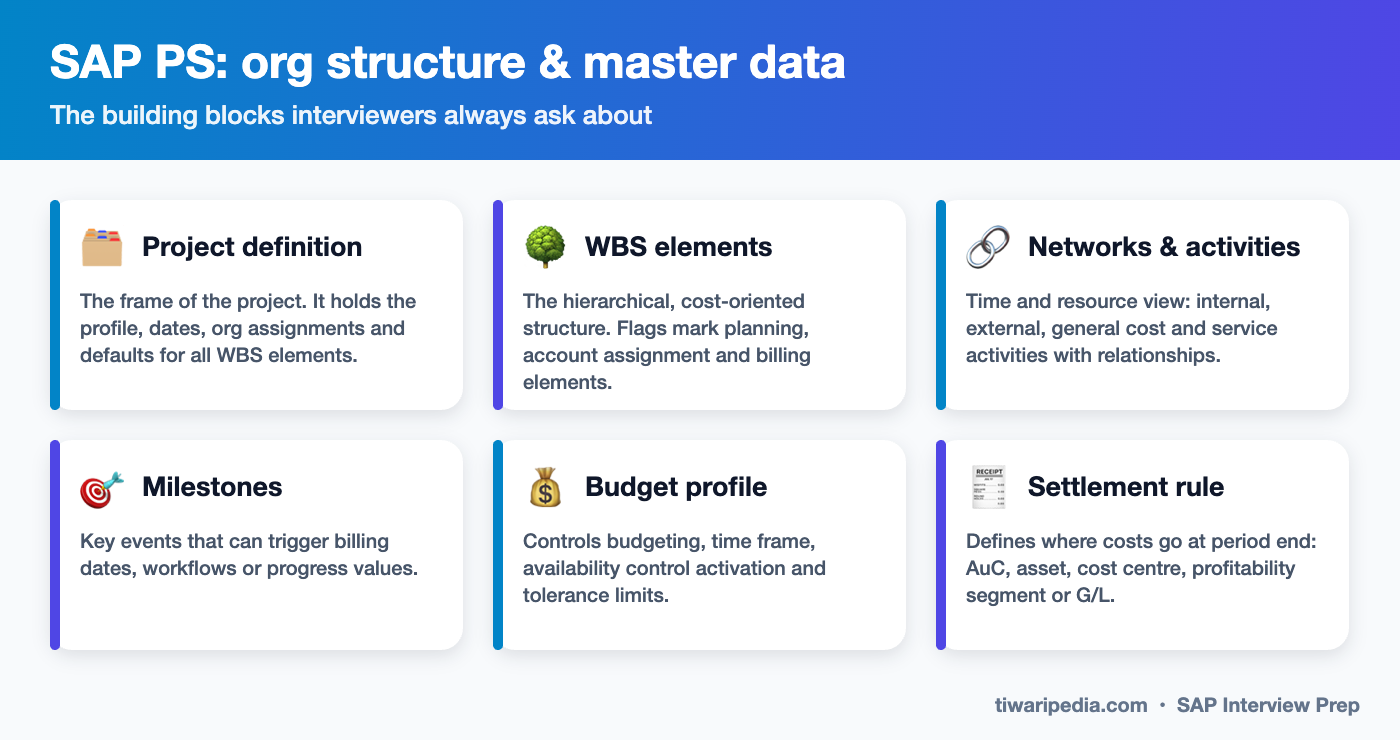
The central control key with the planning, budgeting, scheduling, settlement and results analysis profiles.
Network profile & network type
Control network defaults, scheduling, costing variants and the number range.
Person responsible & applicant
Used for responsibility, workflow and reporting.
Investment Management link
Investment programs connect capex budgets across many projects for portfolio-level control.
Master data
Project definition & WBS (CJ20N)
Structure with operative indicators: planning element, account assignment element, billing element.
Standard structures
- Standard WBS (CJ91)
- Standard network (CN01)
- Copy from template or existing project
Network activities
- Internal processing (work centre and activity type)
- External processing (PR to vendor)
- General costs and service activities
Material components
BOM transfer (CN33) or manual assignment. Can be procured to project stock or plant stock.
Work centres & activity types
Capacity, scheduling and costing of internal labour via the activity rate (KP26).
Milestones & documents
Billing plans, trend analysis, PS texts and DMS documents.
Key T-codes & Fiori apps
Interviewers often ask you to name the transaction or app for a step. You do not need to memorise hundreds, but you should know these confidently.
| T-code / App | What it does |
|---|---|
| CJ20N | Project Builder: create and maintain project, WBS and network |
| CJ01 / CJ02 / CJ03 | Create / change / display WBS element (classic) |
| CN21 / CN22 | Create / change network |
| CJ40 / CJR2 | Overall cost planning / cost element planning |
| CJ9ECP | Easy Cost Planning |
| CJ30 / CJ32 / CJ34 | Original budget / release / budget transfer |
| CN25 / CN41N | Activity confirmation / project structure overview |
| CJI3 / CJI5 | Actual cost line items / commitment line items |
| S_ALR_87013558 | Budget / actual / commitment / remaining plan report |
| CNE1 / CNE5 | Progress analysis calculation / report |
| KKA2 / KKAJ | Results analysis individual / collective |
| CJ88 / CJ8G | Individual / collective settlement |
| CJ91 / CN01 | Standard WBS / standard network templates |
| Fiori: Monitor Projects, Project Cost Report, Project Control | Modern project monitoring and control apps |
What changed in S/4HANA
- The Universal Journal (ACDOCA) stores project actuals in real time with WBS as an account assignment dimension. No separate CO totals tables are needed for reporting.
- Event-based revenue recognition (EBRR) can replace period-end results analysis for customer projects, posting revenue and cost of sales as each event happens.
- Simplifications: some legacy functions (such as Claim Management and the old planning board variants) are deprecated or not the target. Check the Simplification List for your release.
- S/4HANA Cloud Public Edition uses Enterprise Projects and Commercial Project Management apps (Plan Customer Projects, Project Control), while classic PS remains strong in private cloud and on-premise.
- Fiori apps like Monitor Projects, Project Cost Report and Project Brief give live analytics on top of CDS views.
- Business Partner, 40-character material numbers and the new asset accounting affect project settlement and procurement.
Integration points
| With | How it integrates |
|---|---|
| FI / CO | WBS elements are cost objects. Actuals, commitments, overheads (costing sheet) and settlement all flow through CO into the Universal Journal. |
| FI-AA | Capex projects settle to an asset under construction, then to final assets at completion (line item settlement). |
| MM | PRs and POs for external activities and materials, reservations for stock, project stock (special stock Q). |
| SD | Customer projects: sales order linked to a billing WBS, billing plans (milestone or periodic), resource-related billing (DP90). |
| PP | Assembly processing and engineer-to-order: production orders against project stock and WBS-driven MRP. |
| HCM / CATS | Timesheets transferred to network confirmations or as activity allocations to WBS. |
| IM | Investment programs control capex budget distribution across projects. |
Interview questions & answers
Tap a question to see a model answer. They are grouped from fundamentals to scenario-based questions that senior panels love.
🟢 Fundamentals
What is the difference between a WBS element and a network activity? Beginner
Explain the WBS operative indicators. Beginner
What is a project profile? Beginner
What are the types of network activities? Beginner
What is availability control (AVC)? Beginner
What happens when a project is released? Beginner
What is settlement in PS? Beginner
🟡 Intermediate
What is the difference between cost planning and budgeting? Intermediate
Explain the methods of cost planning in PS. Intermediate
How does a capex project settle to an asset? Intermediate
What is results analysis? Intermediate
What is earned value analysis in PS? Intermediate
What is project stock and when is it used? Intermediate
🔴 Scenario & design
A customer project needs milestone-based invoices. How do you design it? Scenario
Users are posting costs beyond the approved budget. How do you control this? Scenario
Settlement fails for many WBS elements at month end. What do you check? Scenario
How would you design a PS structure for a multi-site capex programme? Scenario
How do you handle timesheets for project staff? Scenario
What changes when you move a PS customer to S/4HANA? Scenario
How would you explain WBS vs internal order to a finance manager? Scenario
Solution architect view
Key PS design decisions:
- Structure standards: how many WBS levels, what each level means, coding masks (OPSJ) and templates, so reporting is consistent across projects.
- Project types and profiles: separate profiles for capex, opex, customer and R&D projects, each with its own planning, budget, settlement and results analysis profiles.
- Planning approach: Easy Cost Planning vs network costing, and plan versions for baseline and forecast.
- Budget control: budget levels, release strategy and AVC tolerances aligned with the approval matrix.
- Revenue recognition: results analysis vs event-based revenue recognition for customer projects, agreed with Finance and auditors.
- Integration: SD billing plans, MM project stock, PP for engineer-to-order, CATS and Asset Accounting.
- Reporting: embedded analytics, Fiori project apps, and EVM KPIs (CPI, SPI).
Typical deliverables: PS design document with structure standards, profile matrix, period-end runbook (overheads, results analysis, settlement), and integration specs for SD, MM and FI-AA.
Test yourself: scored PS quiz
Interview tips
- Draw the WBS for a real project you worked on: levels, indicators and settlement receivers.
- Explain the difference between plan, budget, actuals and commitments with numbers.
- Be ready for period-end: overheads, interest, results analysis or EBRR, settlement, in that order.
- For customer projects, link SD billing plans, milestones and revenue recognition clearly.
- Mention S/4HANA items: Universal Journal, EBRR and Fiori project apps.
Keep preparing: 🎯 SAP Interview Prep hub & combined mock test · All SAP interview guides · ERP Software