

Last updated: October 2026 · 7 min read
Turning 18, or never got your name on the voter list? You can apply for a Voter ID (EPIC) completely online, free of cost, using the Election Commission’s ECINET app or the Voters’ Service Portal. Once approved, you can download a digital voter ID, the e-EPIC, in minutes. With the Special Intensive Revision (SIR) of electoral rolls happening across many states, this is the right time to check that your name is on the list.
Who can apply?
- Indian citizens who are 18 years or older on a qualifying date. There are four qualifying dates every year: 1 January, 1 April, 1 July and 1 October.
- Youngsters aged 17+ can apply in advance; their name is added once they turn 18 on the next qualifying date.
- You should be ordinarily resident at the address you apply for.
Which form do you need?
| Form | Use it for |
|---|---|
| Form 6 | New voter registration (first time, or not on any roll) |
| Form 6A | Overseas (NRI) electors |
| Form 7 | Objection to an entry or deletion of a name |
| Form 8 | Correction of details, change of address/shifting, replacement EPIC, marking as person with disability |
Documents required
- Recent passport-size photograph (white background, clear face).
- Proof of age: birth certificate, Class 10 or 12 marksheet, PAN, Aadhaar, passport or driving licence.
- Proof of address: Aadhaar, bank or post office passbook, passport, utility bill (water, electricity, gas), registered rent agreement, etc.
- Aadhaar number is optional on the form.
How to apply for voter ID online: step-by-step
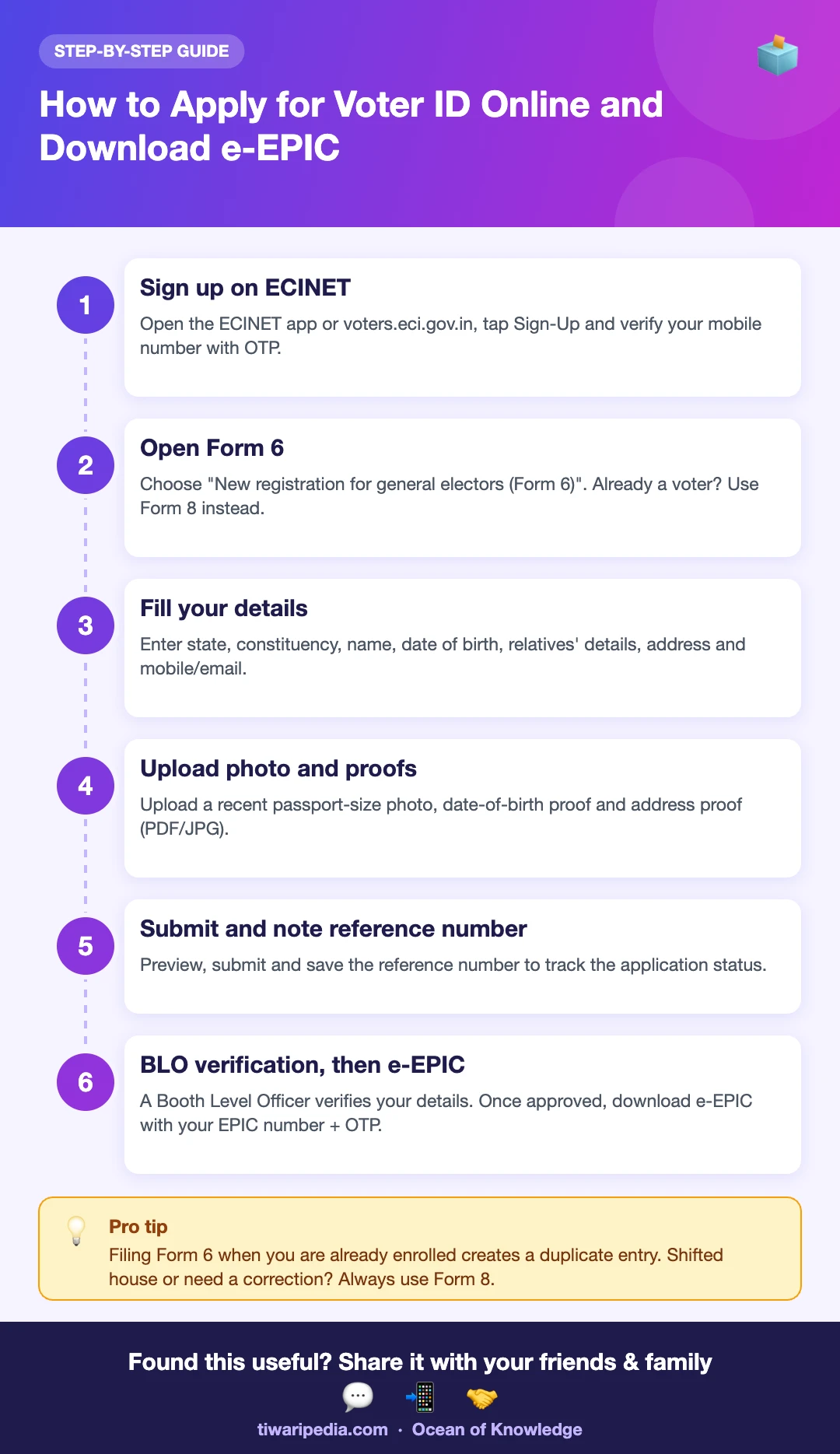
Step 1: Sign up on ECINET
Download the official ECINET app (it merged more than 40 older ECI apps, including Voter Helpline) or open voters.eci.gov.in. Tap Sign-Up, choose Indian Resident Elector, enter your mobile number, optional email and captcha, and verify the OTP.
Step 2: Open Form 6
After logging in, select New registration for general electors (Form 6).
Step 3: Fill your details
Select your state, district and assembly constituency. Enter your name (and in your regional language if asked), gender, date of birth, the name of a relative (father, mother, husband or guardian), your current address, and your mobile number and email.
Step 4: Upload your photo and documents
Upload your photo and the date-of-birth and address proofs. Keep files clear and within the size limit shown on screen. During SIR, Form 6 may include an extra declaration; read and complete it carefully.
Step 5: Submit and save the reference number
Preview, correct any mistakes, and submit. Save the reference number shown on screen and sent by SMS. Use Track Application Status to follow progress.
Step 6: Verification and e-EPIC download
A Booth Level Officer (BLO) may visit your address or call you to verify details. The Electoral Registration Officer (ERO) then approves the application and assigns your EPIC number. The physical card is sent by post; you can download the e-EPIC right away (see below).
How to download e-EPIC (digital voter ID)
- Log in to ECINET or voters.eci.gov.in.
- Select e-EPIC Download.
- Enter your EPIC number, or your Form reference number if you applied recently, and choose your state.
- Verify the OTP sent to the mobile number registered on the electoral roll.
- Download the PDF. If your mobile isn’t on the roll, complete the face-liveness e-KYC to update it, or visit your ERO office.
How to check your name in the voter list
Use Search in Electoral Roll on ECINET or electoralsearch.eci.gov.in. You can search by EPIC number, by personal details, or by mobile number. In states where SIR has been held, you can also use “Search Your Name in Last SIR”.
Frequently asked questions
Is there any fee to apply for a voter ID?
No. Registration and the e-EPIC download are free.
How long does it take to get a voter ID?
Processing time depends on verification and revision schedules. Track status with your reference number; physical EPIC cards are dispatched after the roll is updated.
Can I vote with e-EPIC?
Yes, e-EPIC is a valid voter ID. What matters most is that your name is on the electoral roll; other approved photo IDs are also accepted at the booth.
I moved to another city. Should I fill Form 6 again?
No. Use Form 8 (shifting of residence) so your old entry moves and no duplicate is created.
Keep exploring
- Census 2027 explained
- How to spot fake news
- How to update address in Aadhaar online
- More How To guides on Tiwaripedia
Based on the Election Commission of India’s ECINET and Voters’ Service Portal process at the time of writing. Spotted something that needs updating? Let us know.
Keep reading on Tiwaripedia
- How to Block a Lost or Stolen Phone in India Using Sanchar Saathi (CEIR): Step-by-Step
- How to Update Address in Aadhaar Online: Step-by-Step Guide, Documents and Head of Family Method (2026)
- How to Report Cyber Fraud in India: Call 1930, File on cybercrime.gov.in and Get Your Money Frozen
- How to Edit Photos With Google Gemini AI (Nano Banana): Step-by-Step Guide and Best Prompts
- How to Book a Tatkal Ticket on IRCTC: 2026 Rules, Timings, Aadhaar OTP and Tips for Confirmed Seats
- How to Download Aadhaar Card Online: e-Aadhaar PDF, Masked Aadhaar and Password (2026)
More guides: All Government Schemes articles