

Last updated: October 2026 · 7 min read
Losing a phone is stressful, and the bigger worry is misuse: your UPI apps, photos, WhatsApp and bank OTPs are all on it. The Department of Telecommunications’ Sanchar Saathi portal (its tracking system is called CEIR) lets you block your lost or stolen phone by its IMEI on every Indian mobile network, free of cost. A blocked phone can’t be used with any SIM in India, and if someone tries, police get a traceability alert.
Do these 3 things immediately
- Block your SIM: Call your operator’s customer care from another phone and block the SIM to stop misuse of calls and OTPs.
- Secure your money: Call your bank to block UPI and cards on that number. If any money is lost, call 1930 or report on cybercrime.gov.in.
- Try to locate or erase it: Use Google Find My Device (Android) or Find My (iPhone) to locate, lock or erase the device remotely.
What you need before blocking
- Police complaint copy (FIR or lost-article report) with complaint number
- IMEI number(s) from the phone box, the purchase bill, or your Google/Apple account
- Duplicate SIM of the lost number (to receive the OTP)
- ID proof (Aadhaar, voter ID, passport, etc.)
- Purchase invoice (optional but helpful)
How to block a lost phone on Sanchar Saathi: step-by-step
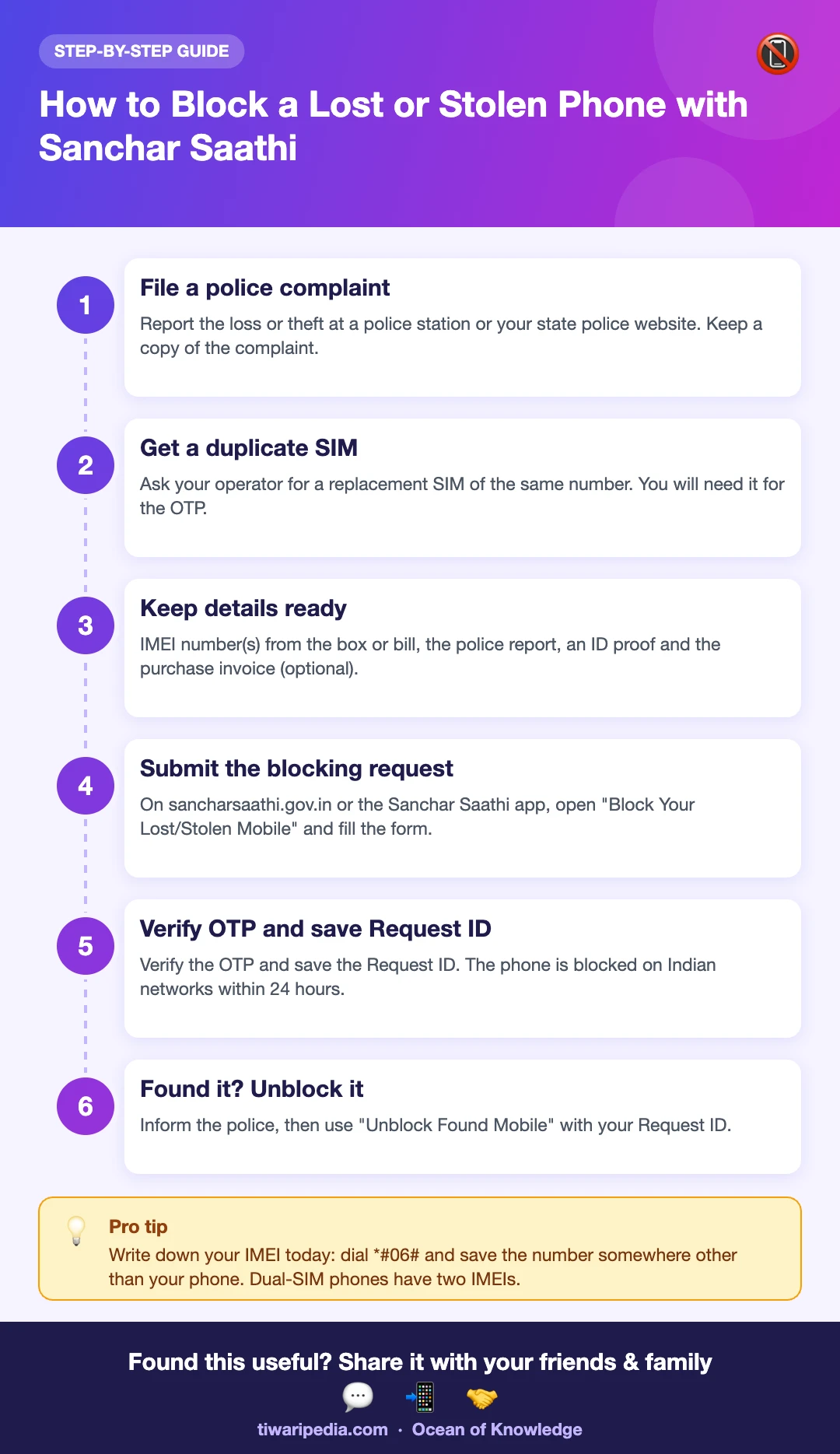
Step 1: File a police complaint
Report the theft or loss at the nearest police station, or use your state police’s online lost-article reporting service. Note the complaint number, police station and date.
Step 2: Get a duplicate SIM
Visit your telecom operator’s store with ID proof to get a replacement SIM of the same number. The OTP for the blocking request is sent to this number. Note: SMS on a reissued SIM may start working only 24 hours after activation.
Step 3: Keep the details and documents ready
Collect the IMEI numbers, device brand and model, the place and date of loss, the police complaint details and your ID proof scan.
Step 4: Submit the blocking request
Go to sancharsaathi.gov.in (or open the Sanchar Saathi app) → Citizen Centric Services → Block Your Lost/Stolen Mobile. Fill in device details, loss information, police complaint details and owner details, and upload the documents.
Step 5: Verify OTP and save your Request ID
Enter the OTP, accept the declaration and submit. Save the Request ID; you need it to check status and to unblock the phone later. The handset is blocked on Indian networks within about 24 hours. If someone uses it, you get an SMS when a traceability report is generated, and police are alerted.
Step 6: Unblock when you get the phone back
Inform the police that the phone has been recovered. Then go to Unblock Found Mobile on Sanchar Saathi, enter your Request ID and verify the OTP. If you had blocked it through the state police, contact them to unblock.
Other useful Sanchar Saathi services
| Service | What it does |
|---|---|
| Know Mobile Connections in Your Name (TAFCOP) | Shows all SIMs issued on your ID; report any you don’t recognise |
| Chakshu | Report suspected fraud calls, SMS and WhatsApp messages (not for money already lost) |
| Know Genuineness of Your Mobile Handset | Check whether an IMEI is genuine before buying a used phone (or SMS “KYM <IMEI>” to 14422) |
| Report Incoming International Call With Indian Number | Flag spoofed international calls showing +91 numbers |
Before buying a second-hand phone
Ask the seller to dial *#06#, then check the IMEI on Sanchar Saathi or by SMS to 14422. If the result shows “blacklisted” or “already in use”, don’t buy it; it may be stolen.
Frequently asked questions
Does blocking the IMEI also block my SIM?
No. IMEI blocking disables the handset. Block or replace your SIM separately with your operator.
Will police actually find my phone?
Many phones have been recovered through CEIR. When the blocked phone is used with any SIM, a trace is generated for the police, which improves recovery chances significantly.
Can I block a phone without a police complaint?
No. A police complaint number is required for the request.
I don’t know my IMEI. What now?
Check the phone box or purchase invoice. For Android, sign in to Google Find My Device; for iPhone, check your Apple account’s device list.
Keep exploring
- Cyber safety basics: 10 simple ways to protect yourself online
- 15 proven tips to make your phone battery last longer
- How UPI works
- How to report cyber fraud and get money frozen (1930)
- More How To guides on Tiwaripedia
Based on the Department of Telecommunications’ Sanchar Saathi portal at the time of writing. Spotted something that needs updating? Let us know.
Keep reading on Tiwaripedia
- How to Link PAN with Aadhaar After the Deadline: Pay ₹1,000 Fee, Link and Check Status (2026)
- How to Download Aadhaar Card Online: e-Aadhaar PDF, Masked Aadhaar and Password (2026)
- 10 Incredible Facts About Video Games
- How to Book a Tatkal Ticket on IRCTC: 2026 Rules, Timings, Aadhaar OTP and Tips for Confirmed Seats
- How to Update Address in Aadhaar Online: Step-by-Step Guide, Documents and Head of Family Method (2026)
- How to Apply for Voter ID Online (Form 6) and Download e-EPIC on ECINET: 2026 Guide
More guides: All How To articles