

Last updated: October 2026 · 7 min read
Moved to a new city or rented a new flat? Your Aadhaar address should match where you live, because banks, gas agencies, telecom companies and many government schemes use it for KYC. The good news: you can update your address in Aadhaar online on UIDAI’s myAadhaar portal without visiting an Aadhaar centre. UIDAI has also extended free online document updates until 14 June 2027.
Who can update address online?
- Anyone whose mobile number is linked to Aadhaar (you need it for the login OTP).
- You need a valid proof of address (PoA) in your own name, or you can use the Head of Family (HoF) method described below.
Documents accepted as proof of address
UIDAI accepts a long list of documents. The most commonly used are:
- Passport
- Bank passbook or statement with photo, signed and stamped by the bank
- Voter ID (EPIC)
- Ration card
- Driving licence
- Electricity, water, gas or landline/broadband bill (usually not older than 3 months)
- Registered rent or lease agreement
- Property tax receipt
Check the full, current list on the myAadhaar upload screen, because UIDAI updates it from time to time.
How to update address in Aadhaar online: step-by-step
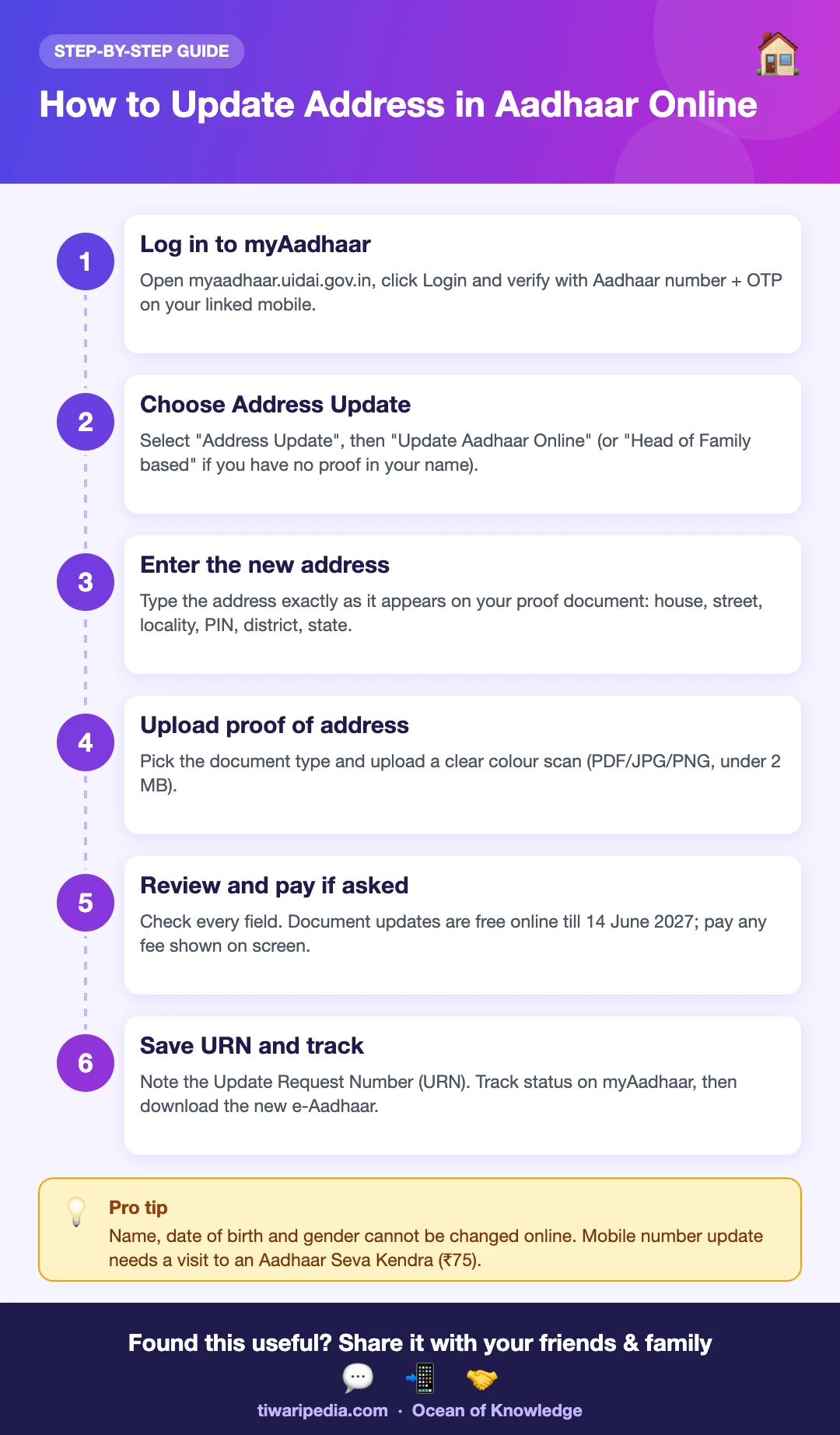
Step 1: Log in to myAadhaar
Visit myaadhaar.uidai.gov.in, click Login, enter your Aadhaar number and captcha, and verify with the OTP sent to your registered mobile.
Step 2: Choose “Address Update”
From the services dashboard, select Address Update. You will see two options: “Update Aadhaar Online” (when you have proof in your own name) and “Head of Family (HoF) based Address Update”.
Step 3: Enter your new address
Fill in house number, street, landmark, area, village/town, post office, district, state and PIN code. Type it exactly as it appears on your proof document; mismatches are the number one reason for rejection.
Step 4: Upload your proof of address
Select the document type from the drop-down and upload a clear, colour scan. Accepted formats are PDF, JPEG or PNG, generally under 2 MB. All corners and the address must be readable.
Step 5: Preview, accept and pay (if applicable)
Preview the details, tick the declaration, and proceed. Online document updates are free until 14 June 2027. If any fee is displayed for your request, pay it through UPI, card or net banking.
Step 6: Save the URN and track status
You will get an Update Request Number (URN) and an acknowledgement slip. Use it under “Check Enrolment & Update Status”. Once approved, download your new e-Aadhaar; you can also order a PVC card.
No address proof in your name? Use the Head of Family method
Spouses, children and parents often don’t have bills in their own name. In that case:
- Choose “Head of Family based Address Update” on myAadhaar.
- Enter the HoF’s Aadhaar number (the family member whose address you want to use).
- Upload a relationship document showing both names, such as a ration card, marriage certificate or passport.
- Pay the service fee shown.
- The HoF gets an SMS and must approve the request on myAadhaar within 30 days. If they reject it or don’t respond, the request is closed.
Online vs Aadhaar centre: what can be changed where?
| Detail | Online (myAadhaar) | Aadhaar Seva Kendra |
|---|---|---|
| Address | Yes | Yes (₹75) |
| Update PoI/PoA documents | Yes, free till 14 June 2027 | Yes (₹75) |
| Name, date of birth, gender | No | Yes (₹75; limited number of times) |
| Mobile number / email | No | Yes (₹75) |
| Photo, fingerprints, iris | No | Yes (₹125; free for mandatory child updates) |
Why requests get rejected (and how to avoid it)
- Address typed differently from the document.
- Blurry, cropped or black-and-white scan.
- Document in someone else’s name without the HoF route.
- Expired or outdated bill.
If rejected, the reason appears on the status screen. Fix it and apply again.
Frequently asked questions
How long does an online address update take?
Most requests are processed within a few days to a few weeks. Track progress with your URN.
Do I need to update Aadhaar after 10 years?
UIDAI recommends refreshing your documents at least once if your Aadhaar is more than 10 years old. It is not mandatory, but it keeps your KYC smooth.
Can I update the address without a mobile number?
No. Online updates need an OTP. Visit an Aadhaar Seva Kendra to link your mobile first.
Will my bank automatically know my new address?
No. After the update, download the new e-Aadhaar and share it with your bank, insurer and gas agency to update their records.
Keep exploring
- How to download Aadhaar card online (e-Aadhaar)
- Cyber safety basics
- Census 2027 explained
- More How To guides on Tiwaripedia
Fees and deadlines are as notified by UIDAI at the time of writing. Check myaadhaar.uidai.gov.in before applying. Spotted something that needs updating? Let us know.
Keep reading on Tiwaripedia
- How to Edit Photos With Google Gemini AI (Nano Banana): Step-by-Step Guide and Best Prompts
- How to Link PAN with Aadhaar After the Deadline: Pay ₹1,000 Fee, Link and Check Status (2026)
- How to Check and Pay Traffic Challan Online: e-Challan Status, 45-Day Rule and Virtual Court (2026)
- How to Book a Tatkal Ticket on IRCTC: 2026 Rules, Timings, Aadhaar OTP and Tips for Confirmed Seats
- How to Download Aadhaar Card Online: e-Aadhaar PDF, Masked Aadhaar and Password (2026)
- How to Report Cyber Fraud in India: Call 1930, File on cybercrime.gov.in and Get Your Money Frozen
More guides: All Government Schemes articles