

Last updated: October 2026 · 7 min read
Traffic cameras now issue challans automatically for overspeeding, signal jumping, no helmet, no seat belt and wrong parking, and you may not even know you got one until your RC renewal or insurance gets stuck. The good news: you can check and pay any e-challan online in a few minutes on the government’s Parivahan e-Challan portal. New rules in 2026 also give you a clear 45-day window to pay or contest a challan online.
Ways to check your challan
| Search by | What you need |
|---|---|
| Challan number | The number from the SMS or notice |
| Vehicle number | Registration number plus last digits of chassis or engine number |
| Driving licence (DL) number | DL number and date of birth |
Some states (for example, cities with their own traffic police portals) also show challans on their state websites, but the national Parivahan portal covers most of India.
How to check and pay a traffic challan online: step-by-step
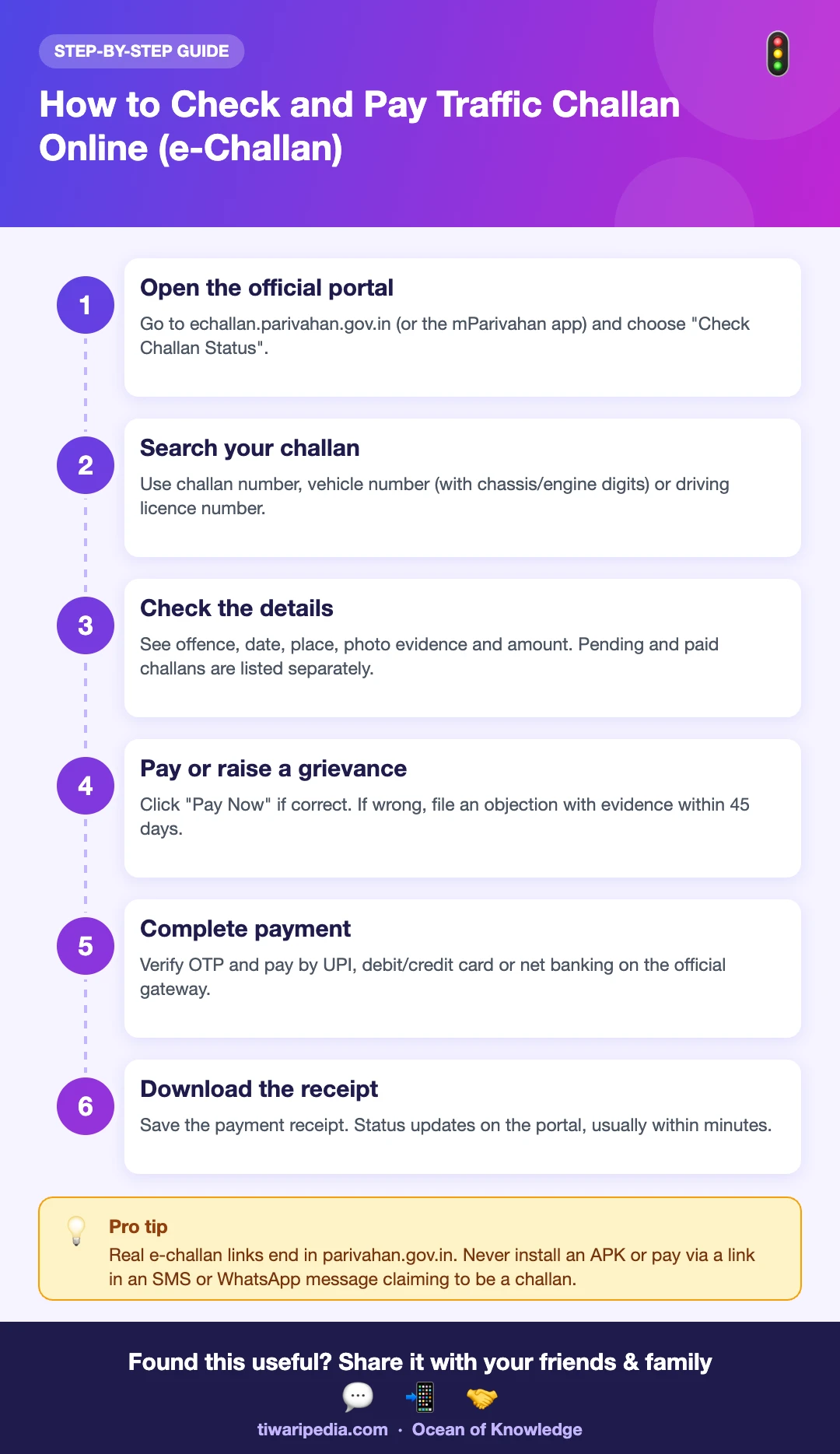
Step 1: Open the official e-challan portal
Go to echallan.parivahan.gov.in or open the mParivahan app. Click Check Online Services → Check Challan Status (or Pay Online).
Step 2: Search your challan
Choose one option: challan number, vehicle number, or DL number. Enter the details and the captcha, then click Get Detail.
Step 3: Review the challan details
You’ll see the offence, date, time, location, amount, issuing authority and often a photo or video as evidence. Pending and disposed challans are listed separately. Check that the vehicle number in the photo is really yours.
Step 4: Pay, or raise a grievance if it’s wrong
If the challan is correct, click Pay Now. If it’s wrong (wrong vehicle, cloned number plate, you had already paid), use the grievance or objection option on the portal and upload evidence. Do this within 45 days of the challan date.
Step 5: Complete the payment
Verify the OTP sent to your registered mobile number, choose UPI, debit card, credit card or net banking, and pay on the official payment gateway.
Step 6: Download the receipt
Download and save the receipt. The challan status usually updates within minutes. If money is deducted but status doesn’t change, wait 24-48 hours; failed payments are usually refunded in 3-7 working days.
The 45-day rule and what happens if you don’t pay
Under amendments to the Central Motor Vehicles Rules notified in 2026:
- You get 45 days from the challan date to pay or contest it online with evidence.
- If you don’t object in 45 days, the challan is treated as accepted and must be paid within the next 30 days.
- If your objection is rejected, you can pay, or deposit part of the amount and appeal in court within the time allowed.
- Unpaid challans can get your vehicle marked “Not to be Transacted” on Vahan, which blocks RC renewal, ownership transfer, address change and other services, and can affect licence services.
- Repeated offences (reports mention five or more challans in a year) can lead to driving licence suspension.
Implementation can vary by state, so check with your state transport department or traffic police.
Challan sent to court? Use the Virtual Court
If a challan has been forwarded to court, it shows as “sent to virtual court” or “court challan”. Visit vcourts.gov.in, select your state’s traffic virtual court, search with your challan or vehicle number, and pay the fine decided by the court online. Many states also settle pending challans through Lok Adalats held periodically.
Beware of fake challan messages
Scammers send SMS and WhatsApp messages with fake “e-challan” links or APK files that steal bank details. Remember:
- Official links end in .gov.in (echallan.parivahan.gov.in).
- Never download an app file (.apk) from a message.
- Always check a challan by typing the official address yourself.
- If you lost money, call 1930 immediately.
Frequently asked questions
How do I know if I have a challan?
You usually get an SMS on the mobile registered with your vehicle RC. Check the Parivahan portal regularly anyway, especially if your number changed.
Can I pay someone else’s challan?
Yes. Anyone can pay using the challan or vehicle number; the OTP goes to the registered mobile in some cases.
I sold my vehicle, but challans still come to me. What should I do?
Make sure the ownership transfer is completed on Vahan, and raise a grievance with the sale proof for challans issued after the sale date.
Will an unpaid challan affect my insurance?
Pending challans can block vehicle-related services, so it’s best to clear them before your insurance or RC renewal.
Keep exploring
- Car and bike insurance: third-party vs comprehensive
- Cyber safety basics
- How to report cyber fraud (1930)
- More How To guides on Tiwaripedia
Based on the Parivahan e-Challan portal and rule changes reported in 2026. Rules and fines can differ by state; check your state traffic police website. Spotted something that needs updating? Let us know.
Keep reading on Tiwaripedia
- How to Apply for Voter ID Online (Form 6) and Download e-EPIC on ECINET: 2026 Guide
- How to Book a Tatkal Ticket on IRCTC: 2026 Rules, Timings, Aadhaar OTP and Tips for Confirmed Seats
- How to Link PAN with Aadhaar After the Deadline: Pay ₹1,000 Fee, Link and Check Status (2026)
- How to Edit Photos With Google Gemini AI (Nano Banana): Step-by-Step Guide and Best Prompts
- How to Block a Lost or Stolen Phone in India Using Sanchar Saathi (CEIR): Step-by-Step
- Sukanya Samriddhi Yojana (SSY) 2026: 8.2% Interest, Eligibility, Maturity Calculator and Withdrawal Rules
More guides: All Government Schemes articles