


Need to merge two PDFs for a job application, shrink a scanned document under a 2 MB upload limit, or make a passport size photo for a form — without installing software or uploading private documents to an unknown website? Meet TiwariPDF: a set of free online PDF tools and a passport size photo maker that work entirely inside your browser.
In this guide we explain every tool step by step with real screenshots — merge, split, compress, organize, rotate, sign, watermark, add page numbers, convert JPG to PDF and PDF to JPG, make passport and visa photos, and resize photos and signatures to an exact KB size for exam and government forms.
Table of contents
- What is TiwariPDF?
- Why “no upload” matters for your privacy
- All tools at a glance
- How to merge PDF files
- How to compress a PDF (reduce PDF size)
- How to split a PDF or extract pages
- Organize, rotate and delete PDF pages
- Convert JPG to PDF and PDF to JPG
- How to sign a PDF online
- Add page numbers and watermarks
- Passport size photo maker
- Resize photo and signature to KB for online forms
- Tips for submitting documents online
- FAQ
What is TiwariPDF?
TiwariPDF (pdf.tiwaripedia.com) is Tiwaripedia’s free PDF converter and photo toolkit with a clean, Mac-style design. It works on Windows, Mac, Linux, Chromebook, Android and iPhone — just open the website, pick a tool and drop your file. There is no sign-up, no watermark on your files and no software to install.

Why “no upload” matters for your privacy
Most online PDF converters work by uploading your file to their server, processing it there, and sending it back. That is fine for a recipe, but not ideal for an Aadhaar card, PAN card, bank statement, salary slip, rental agreement or medical report.
TiwariPDF is different: every tool runs locally in your web browser using modern JavaScript. Your documents and photos are processed on your own phone or computer and are never sent to our server. Once the page has loaded, most tools keep working even if your internet connection is slow.
| Feature | Typical upload-based converters | TiwariPDF |
|---|---|---|
| Where your file is processed | On their server | On your own device |
| Sign-up needed | Often, for more tasks | Never |
| Watermark on output | Sometimes on free plans | Never |
| Waiting for upload/download | Yes, slow on mobile data | No upload at all |
| Price | Free with limits, or paid | Free |
All tools at a glance
| Tool | What it does | Best for |
|---|---|---|
| Merge PDF | Combine several PDFs into one, in any order | Job applications, project reports |
| Split PDF | Split by page ranges, extract pages, or one file per page | Sending only the pages that matter |
| Compress PDF | Reduce PDF file size with 3 levels + black & white | Upload limits, email attachments |
| Organize PDF | Reorder, rotate and delete pages visually | Fixing scanned documents |
| Rotate PDF | Rotate all pages 90°, 180° or 270° | Sideways scans |
| JPG to PDF | Turn photos and screenshots into one PDF | Submitting phone-camera scans |
| PDF to JPG | Convert each page to a JPG or PNG image | Sharing on WhatsApp, slides |
| Sign PDF | Draw, type or upload a signature and place it | Agreements, forms, letters |
| Page numbers | Add “1”, “Page 1” or “Page 1 of 10” | Reports, theses, assignments |
| Watermark PDF | Stamp text like CONFIDENTIAL or COPY | Protecting shared copies |
| Passport size photo | Passport & visa photos with AI background removal and print sheets | Passport, visa, ID, exam forms |
| Resize photo to KB | Exact cm/px size under a KB limit | SSC, UPSC, bank and job forms |
| Compress image | Smaller JPG/WebP with a quality slider | Websites, email |
| Convert image | JPG ⇄ PNG ⇄ WebP | Format requirements |
How to merge PDF files online (free)
- Open Merge PDF.
- Click Select PDF files or drag them into the box. Add more files any time with + Add more PDFs.
- Drag the thumbnails to set the order — the number on each card shows its position.
- Click Merge PDF. Your combined file downloads instantly as merged.pdf.

Tip: for job applications, a common order is cover letter → resume → certificates → ID proof. One clean PDF looks far more professional than five separate attachments.
How to compress a PDF (reduce PDF file size)
Government portals, university admissions and job sites often accept PDFs only up to 1 MB, 2 MB or 5 MB. Scanned documents from a phone can easily be 10–20 MB. Here is how to shrink them:
- Open Compress PDF and select your file.
- Choose a level: Extreme (smallest), Recommended (best balance) or Light (best quality).
- Optional: tick Convert to black & white for text documents — it makes files even smaller.
- Click Compress PDF and see the before/after size.

| Level | Quality | Use it for |
|---|---|---|
| Extreme | 72 dpi – readable on screen | Strict upload limits |
| Recommended | 110 dpi – clear text and photos | Most forms and emails |
| Light | 150 dpi – near original | Documents you may print |
Good to know: compression works best on scanned and image-heavy PDFs. Pages are re-rendered as optimised images, so text in the compressed file is no longer selectable. If a file is already small and text-based, TiwariPDF tells you instead of making it bigger.
How to split a PDF or extract pages
Split PDF has three modes:
- Page ranges – type ranges such as
1-3, 4-6, 7-end; each range becomes its own PDF. - Extract pages – pick pages like
2, 5, 8-10and get them in one new PDF. - Every page – each page becomes a separate PDF, downloaded together as a ZIP file.
Organize, rotate and delete PDF pages
Scanned a document in the wrong order or with one page upside down? Open Organize PDF: every page appears as a thumbnail. Drag pages to reorder, press ↻ to rotate a single page and ✕ to delete it (press again to restore), then click Save PDF. To turn the whole document, use Rotate PDF.
Convert JPG to PDF and PDF to JPG
JPG to PDF: many portals want one PDF, but your documents are photos on your phone. JPG to PDF accepts JPG, PNG and WebP, lets you arrange the order, and creates A4, Letter or fit-to-image pages with optional margins. Landscape photos are rotated automatically on “Auto”.
PDF to JPG: need to share a page on WhatsApp or put it in a presentation? PDF to JPG converts every page (or a range you choose) to JPG or PNG in normal, high or very high quality. Multiple pages download as a ZIP.
How to sign a PDF online
- Open Sign PDF and select your document.
- Create your signature: Draw it with your mouse or finger, Type your name in a handwriting style, or Upload a photo of your signature (white paper is removed automatically).
- Click on the page where the signature should go and adjust the size slider.
- Optionally tick Put on every page, then click Sign & download.

Important: this adds an image of your signature, which is perfect for everyday letters and forms. Some official processes in India require a certified digital signature (DSC) or Aadhaar eSign instead — always follow the instructions of the organisation you are submitting to.
Add page numbers and watermarks
Add Page Numbers supports six positions, four styles (1 · Page 1 · 1 / 10 · Page 1 of 10), a custom start number, font size and an option to skip the cover page. Watermark PDF stamps any text — CONFIDENTIAL, DRAFT, “Copy for bank use only” — centred or tiled, with your choice of colour, opacity, size and angle.
Smart tip: before sharing a copy of your ID card, add a watermark such as “For XYZ application only – 27 Nov 2026”. It makes misuse of the copy much harder.
Passport size photo maker online (free)
Skip the studio queue. The passport size photo maker turns a clear phone photo into a correctly sized passport, visa or ID photo — and prints several copies on one sheet.
- Take a photo facing the camera, against a plain wall, in good daylight, with a neutral expression.
- Open the tool and upload the photo.
- Choose your country / size preset.
- Drag and zoom until your face fits the blue oval, with the top of your head and your chin between the two red guide lines. Use Rotate, Brightness and Contrast if needed.
- Click ✨ Remove background (AI) and choose white, light grey or light blue. (The first time, the AI model downloads once — about 40 MB.)
- Click Download photo for a 300 DPI JPG, optionally under a KB limit for online forms.
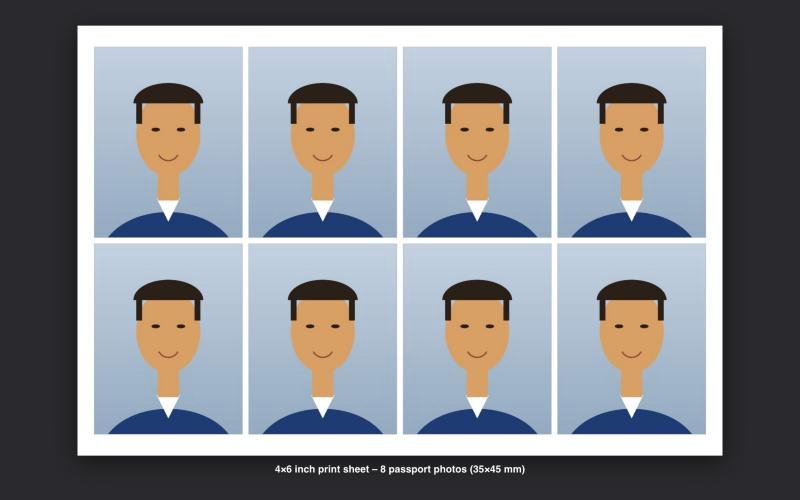
- Click 🖨 Sheet to get a print-ready 4×6 inch, 5×7 inch or A4 sheet as JPG or PDF.

| Document | Common photo size | Preset in TiwariPDF |
|---|---|---|
| Indian passport (Passport Seva) | 35 × 45 mm | 🇮🇳 India passport (new) |
| India OCI card / some Indian visa & embassy services | 2 × 2 inch (51 × 51 mm) | 🇮🇳 India OCI / visa |
| USA passport & visa | 2 × 2 inch (51 × 51 mm) | 🇺🇸 USA |
| UK passport, Schengen visa, Australia | 35 × 45 mm | 🇬🇧 / 🇪🇺 / 🇦🇺 |
| Canada passport | 50 × 70 mm | 🇨🇦 Canada |
| China visa | 33 × 48 mm | 🇨🇳 China |
| PAN card | 25 × 35 mm | 🇮🇳 PAN card |
| Exam / job forms | often 3.5 × 4.5 cm | 📝 Exam/job form |
India moved to the international 35 × 45 mm format for passport photos, while OCI and many visa services still ask for the 2 × 2 inch square — so choose the preset that matches your exact application.
Resize photo and signature to KB for online forms
SSC, UPSC, banking, railway, university and many job portals ask for a photo and signature in exact dimensions and below a limit such as 20 KB or 50 KB. Getting this wrong is one of the most common reasons an online form fails to upload. Resize Photo to KB solves it in one click:
- Upload your photo or a scan of your signature.
- Pick a preset — e.g. Exam/job photo 3.5 × 4.5 cm, max 50 KB or Signature 3.5 × 1.5 cm, max 20 KB — or enter your own size in px, cm, mm or inches.
- Choose Crop to fill or Fit (white border).
- Click Resize & download. The tool automatically finds the best quality that stays under your KB limit.

Tips for submitting documents online
- Read the notification first: note the exact size (cm or pixels), file type (JPG/PDF) and KB/MB limits before you start.
- Scan in good light: place documents on a dark surface near a window; avoid shadows and flash glare.
- One PDF per document type: use JPG to PDF to combine the front and back of an ID card into one file.
- Compress last: merge and organize first, then compress the final PDF once.
- Name files clearly: e.g. Pravin_Tiwari_Resume.pdf rather than scan001.pdf.
- Keep originals: TiwariPDF never changes your original files — it always creates new downloads.
Frequently asked questions
Is TiwariPDF really free?
Yes. All PDF and photo tools on pdf.tiwaripedia.com are free to use, with no sign-up and no watermark on your files.
Are my files uploaded to a server?
No. Every tool runs inside your web browser, so your PDFs and photos are processed on your own device and are never uploaded to or stored on our server.
How can I reduce PDF size to under 1 MB or 2 MB?
Use Compress PDF with the Recommended level. If the file is still too large, choose Extreme or tick Convert to black & white. Scanned documents usually shrink the most.
What is the passport size photo size in India?
Indian passport applications use 35 × 45 mm photos, while OCI cards and many visa services ask for a 2 × 2 inch (51 × 51 mm) square photo. Always check the latest official rules for your application.
How do I make a passport size photo with a white background?
Upload your photo in the Passport Size Photo tool, choose your size, click Remove background (AI), select white and download the photo or a print sheet.
How do I resize a photo to 20 KB or 50 KB?
Open Resize Photo to KB, choose a preset or enter your dimensions, set the maximum KB and click Resize & download. The tool picks the highest quality that stays under your limit.
Can I convert Word to PDF?
Not yet — Word to PDF needs server-side processing, which would mean uploading your file. In Microsoft Word or Google Docs you can use File → Save as / Download → PDF, then use TiwariPDF to merge, compress or sign it.
Try TiwariPDF today
Whether you are a student filling an exam form, a job seeker sending documents, a small business owner signing agreements or a traveller applying for a visa, TiwariPDF gives you fast, free and private tools in one place. Bookmark pdf.tiwaripedia.com and share it with friends who keep asking “how do I reduce this PDF size?” 😊
Also try our free typing speed test and typing race game to type faster — perfect for filling forms and writing AI prompts.
Keep reading on Tiwaripedia
- Free Financial Calculators for India: EMI, SIP, Income Tax 2026-27, PPF & More
- How to Block a Lost or Stolen Phone in India Using Sanchar Saathi (CEIR): Step-by-Step
- Free Online Unit Converter: Acre to Sq Ft, Currency, Number to Words & More
- How to Increase Typing Speed: Free Typing Test, Lessons & Race Game
- How to Report Cyber Fraud in India: Call 1930, File on cybercrime.gov.in and Get Your Money Frozen
- How Do AI Chatbots Work? A Simple Guide for Everyone (2026)
More guides: All Technology articles