

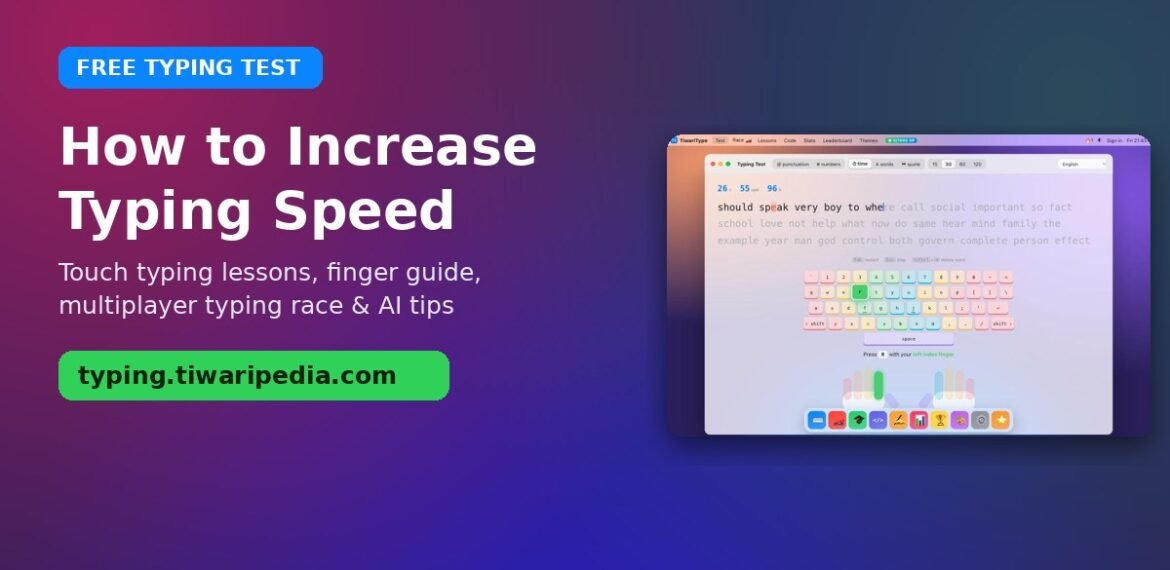
Do you still look down at the keyboard while typing? Do long emails, reports or AI prompts take you forever to write? You are not alone. The good news: typing speed is a skill, not a talent. With the right finger technique and 15 minutes of smart practice a day, most people can double their speed in a few weeks.
In this complete guide you will learn how to increase typing speed step by step — from correct finger placement to a 30-day practice plan — and why fast, accurate typing matters even more now that we all work with AI apps like ChatGPT, Gemini, Claude and Microsoft Copilot. We will also show you TiwariType, our free typing test and trainer, with real screenshots so you can start practising today.
Table of contents
- What is a good typing speed?
- How typing speed (WPM) is calculated
- Meet TiwariType – free typing test, lessons and race game
- How to increase typing speed: 12 proven tips
- Correct finger placement (touch typing chart)
- 30-day plan to double your typing speed
- Why typing speed matters in the age of AI
- How to type better AI prompts, faster
- Typing race: practise with friends
- Earn TiwariType Pro for free
- FAQ
What is a good typing speed?
Typing speed is measured in words per minute (WPM). An average adult who types with two or three fingers usually lands somewhere around 35–40 WPM. People who learn proper touch typing commonly reach 60–80 WPM, and dedicated typists go well beyond 100 WPM. Speed alone is not enough though — accuracy matters just as much. A 70 WPM typist with 98% accuracy is far more productive than a 90 WPM typist who keeps pressing backspace.
| Speed (WPM) | Level | What it means in daily work |
|---|---|---|
| Below 30 | Beginner | Still hunting for keys; typing slows down your thinking. |
| 30–45 | Average | Fine for chats, but long emails and reports feel tiring. |
| 45–65 | Good | Comfortable for office work, study notes and AI prompts. |
| 65–90 | Fast | Typing keeps up with your thoughts – great for writers, coders and support teams. |
| 90+ | Expert | Professional level – you think in sentences, not keys. |
How typing speed (WPM) is calculated
Typing tests count every 5 characters (including spaces) as one “word”, so long and short words are treated fairly. A good typing test reports three numbers:
- WPM (net speed) – only characters of words you typed correctly, divided by 5, divided by the minutes taken.
- Raw WPM – every key you pressed, including mistakes. The gap between raw and net WPM shows how much speed you lose to errors.
- Accuracy – the percentage of keystrokes that were correct.
Example: you type 250 correct characters in one minute → 250 ÷ 5 = 50 WPM. TiwariType uses exactly this honest method: a word with a mistake does not count towards your WPM, so your score reflects your real, usable speed.
Meet TiwariType – free typing test, lessons and race game
TiwariType is Tiwaripedia’s free, Mac-style typing trainer. It works in any browser on Windows, Mac, Linux and Chromebook — no download and no sign-up needed to start.

- Typing speed test – 15, 30, 60 or 120 seconds, word count or famous quotes, with optional punctuation and numbers.
- Accurate WPM – net WPM, raw WPM, accuracy and consistency, plus a speed chart for every test.
- Finger guide – every key is coloured by the finger that should press it, and animated hands show the correct finger in real time.
- Finger School – 10 beginner drills that teach touch typing one finger at a time.
- 15 guided lessons including a weak-key trainer built from your own mistakes.
- Code practice – type real code snippets, perfect for developers.
- Typing race – a live multiplayer car race; race friends, anyone online, or AI bots.
- Stats & key heatmap – see your progress over time and which keys slow you down.
- 100% free – and regular users unlock Pro for free just by practising.
How to increase typing speed: 12 proven tips
1. Measure your starting point
Take a 60-second typing speed test and write down your WPM and accuracy. You cannot improve what you do not measure, and seeing your numbers climb every week is the best motivation.
2. Sit correctly
Feet flat on the floor, back straight, elbows bent at roughly 90 degrees and wrists floating just above the keyboard. Keep the screen at eye level. Good posture reduces fatigue and lets your fingers move freely.
3. Learn the home row
Your fingers always start and return to the home row: left hand on A S D F, right hand on J K L ;. Feel for the small bumps on F and J — they let you find the home position without looking.
4. Use the correct finger for every key
This single habit makes the biggest difference. Each finger owns a column of keys (see the chart below). It feels slower for the first few days, but it is the only way past the 40 WPM “two-finger ceiling”.
5. Stop looking at the keyboard
Keep your eyes on the screen. If you must, cover your hands with a cloth for a few practice sessions. TiwariType’s on-screen keyboard highlights the next key so you never need to look down.
6. Accuracy first, speed second
Slow down until you reach 95%+ accuracy. Every mistake costs you a backspace, a correction and your rhythm. Speed grows naturally once your fingers stop making errors.
7. Type with a steady rhythm
Aim for an even beat instead of fast bursts followed by pauses. TiwariType shows a consistency score after every test — higher consistency usually means faster typing in the long run.
8. Practise little and often
15–20 focused minutes every day beat a two-hour session once a week. Muscle memory is built by repetition and sleep. TiwariType tracks your daily streak 🔥 to keep you consistent.
9. Train your weak keys
Most people have 5–7 keys that cause most of their mistakes. The key heatmap and the weak-key lesson in TiwariType find them automatically and build drills just for you.
10. Practise real text, punctuation and numbers
Once letters feel easy, switch on punctuation and numbers, try quote mode and code practice. Real work is full of commas, capitals and digits.
11. Make it fun with typing games
Competition pushes you to type faster than you thought possible. Race your friends or AI cars in the TiwariType race game — your car only moves when you type correctly.
12. Rest your hands
Take a short break every 20–30 minutes, stretch your fingers and wrists, and stop if you feel pain. Relaxed hands are fast hands.
Correct finger placement (touch typing chart)
Touch typing means each finger is responsible for its own keys. Here is the standard layout used on QWERTY keyboards:
| Finger | Left hand keys | Right hand keys |
|---|---|---|
| Little finger (pinky) | ` 1 Q A Z, left Shift, Tab, Caps Lock | 0 – = P [ ] ; ‘ /, Enter, right Shift, Backspace |
| Ring finger | 2 W S X | 9 O L . |
| Middle finger | 3 E D C | 8 I K , |
| Index finger | 4 5 R T F G V B | 6 7 Y U H J N M |
| Thumbs | Space bar | |
Learning this chart from a table is hard, so TiwariType teaches it visually. Finger School colours every key by finger and walks you through 10 short drills: home row, left index, right index, middle fingers, ring fingers, little fingers, thumbs, Shift and capitals, the number row, and finally everything together. It even shows your accuracy for each finger.

30-day plan to double your typing speed
Follow this simple plan for 20 minutes a day. Results vary from person to person, but most learners who stick with it see a clear jump in both speed and accuracy.
| Week | Focus | Daily routine (20 min) | Goal |
|---|---|---|---|
| Week 1 | Home row & finger placement | Finger School drills 1–6, one 60-second test at the end | Never look at the keyboard |
| Week 2 | All letters, accuracy | Finger School 7–10, guided lessons, two 30-second tests | 95% accuracy |
| Week 3 | Rhythm & weak keys | Weak-key lesson, punctuation & numbers, three 60-second tests | Consistency above 75% |
| Week 4 | Speed under pressure | Typing races, quote mode, code practice, one 120-second test | +50% WPM vs day 1 |
Why typing speed matters in the age of AI
Some people think AI makes typing less important. In reality it is the opposite: the keyboard is how most of us talk to AI. Whether you use ChatGPT, Google Gemini, Claude, Microsoft Copilot, Perplexity, GitHub Copilot or AI features inside business software, the quality of the answer depends on the quality of what you type.
- Better prompts need more words. Good prompts include context, examples, constraints and the format you want. Slow typists tend to write short, vague prompts — and get vague answers.
- Faster iteration. Working with AI is a conversation: ask, review, refine, ask again. If you type twice as fast, you can try twice as many ideas in the same time.
- Precision beats voice in many places. Voice input is useful, but in offices, classrooms, trains and meetings typing is quieter, more private and better for code, names, numbers and formatting.
- AI coding assistants still need you to type. Developers describe what they want, review suggestions and edit code — fast, accurate typing (including symbols) keeps you in flow.
- Editing AI output is typing. AI gives you a first draft; you still correct facts, adjust tone and add your own knowledge.
- Less effort, more thinking. When your fingers work automatically, your brain is free to focus on what to ask instead of where the keys are.
How to type better AI prompts, faster
Combine fast typing with a simple structure and your AI results improve immediately. Try this five-part template in any AI app:
- Role – “You are an experienced HR manager…”
- Task – “Write a polite email declining a meeting…”
- Context – who it is for, background facts, what has happened so far.
- Constraints – length, tone, language, what to avoid.
- Format – bullet points, table, email, code, step-by-step.
You are a friendly English teacher. Explain the difference between "affect" and "effect" to a 12-year-old student. Use 3 simple examples from school life, keep it under 150 words, and finish with a 3-question quiz.
That prompt is about 40 words. At 25 WPM it takes almost two minutes to type; at 60 WPM it takes about 40 seconds. Over dozens of prompts a day, faster typing saves real time — and makes you more willing to write the detailed prompts that get great answers.
- Learn shortcuts: Ctrl/Cmd + Backspace deletes a whole word, Shift + Enter adds a new line in most AI chat boxes without sending.
- Practise punctuation and numbers — prompts are full of quotes, commas, brackets and figures.
- Practise code mode if you use AI for programming; symbols like
{ } ( ) [ ] = ;are where most people slow down.
Typing race: practise with friends
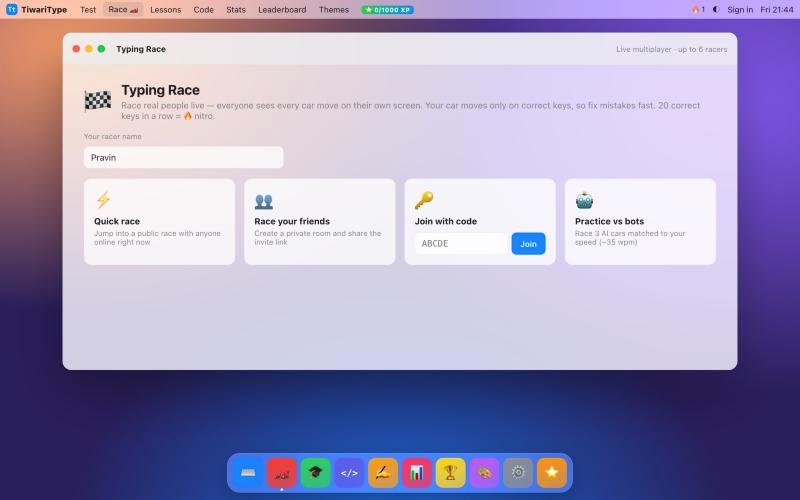
Practice is easier when it is fun. The TiwariType typing race turns your typing into a live car race. Every racer sees every car move on their own screen in real time.

- ⚡ Quick race – join a public race with anyone online; it starts automatically when two or more racers join.
- 👥 Race your friends – create a private room and share the invite link or 5-letter code (up to 6 racers). Perfect for classrooms, offices and family competitions.
- 🔑 Join with code – enter a friend’s room code.
- 🤖 Practice vs bots – race three AI cars matched to your own speed.
Tip for teachers and team leaders: create a private room, share the link on WhatsApp or Teams, and run a 2-minute typing race at the start of a class or meeting. It is a quick, fun way to build an important digital skill.
Earn TiwariType Pro for free
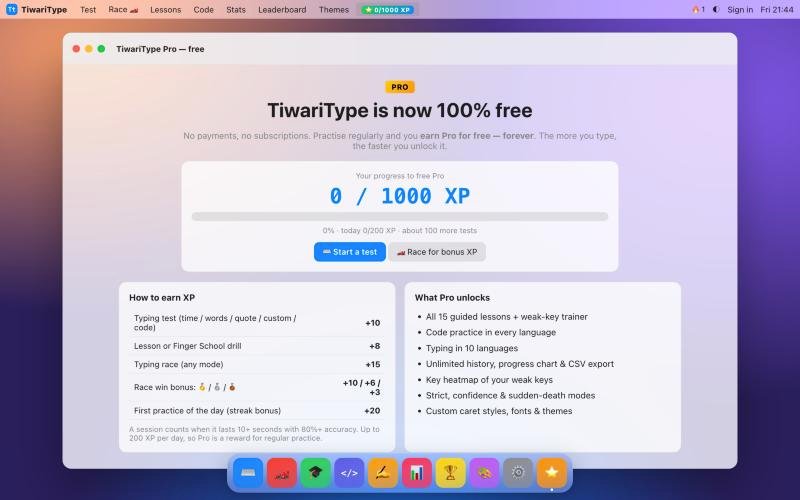
TiwariType is completely free. There is nothing to buy — users who practise regularly earn Pro for free by collecting XP:
- Typing test: +10 XP · Lesson or Finger School drill: +8 XP · Typing race: +15 XP
- Race podium bonus: 🥇 +10, 🥈 +6, 🥉 +3 · First practice of the day: +20 XP
- Reach 1,000 XP and Pro is unlocked: all 15 lessons, code practice in every language, 10 typing languages, unlimited history, progress charts, key heatmap and more.
Frequently asked questions
How can I increase my typing speed fast?
Learn the home row and the correct finger for each key, stop looking at the keyboard, focus on 95%+ accuracy, and practise 15–20 minutes every day. Free tools like TiwariType’s Finger School and typing tests make this structured and measurable.
What is a good typing speed in WPM?
Around 40 WPM is a typical average. 50–65 WPM is good for most office jobs and students, 65–90 WPM is fast, and anything above 90 WPM is expert level — always with high accuracy.
How long does it take to learn touch typing?
Most people learn the finger positions in one to two weeks of daily practice. Getting fast and comfortable takes a few more weeks. Consistency matters more than long sessions.
Is TiwariType really free?
Yes. The typing test, lessons, Finger School and typing race are free, and active users unlock Pro features for free by earning 1,000 XP through regular practice.
Does typing speed still matter if I use AI tools like ChatGPT?
Yes. You type prompts, follow-up questions and edits all day. Faster, more accurate typing lets you write more detailed prompts, iterate quicker and get better results from any AI app.
Can I play a typing race with my friends?
Yes. Open the Race page on TiwariType, click “Race your friends” and share the invite link. Up to six people can race live, and everyone sees all the cars move on their own screen.
Does TiwariType work on mobile?
The site opens on phones and tablets, but touch typing is best learned on a physical keyboard — a laptop, desktop or a tablet with a keyboard attached.
Start improving your typing speed today
Fast and accurate typing is one of the most useful skills for school, work and the AI era — and it is completely learnable. Take a free typing test now, note your WPM, follow the 30-day plan above, and come back in a month to see how far you have come. Share your result in the comments below! 👇
Keep reading on Tiwaripedia
- How to Report Cyber Fraud in India: Call 1930, File on cybercrime.gov.in and Get Your Money Frozen
- Free Online Unit Converter: Acre to Sq Ft, Currency, Number to Words & More
- AI and Jobs: Advantages and Disadvantages of Claude, Copilot, Agentic and Generative AI (2026)
- How to Block a Lost or Stolen Phone in India Using Sanchar Saathi (CEIR): Step-by-Step
- 10 Incredible Facts About QR Codes
- 10 Incredible Facts About Video Games
More guides: All Technology articles