

🧩 Salesforce clouds & modules explained
Salesforce is a family of products. This guide explains what each cloud does, who uses it, its key features and how they fit together, so you can choose a career path or a solution with confidence.
In SAP you hear about “modules” such as FI, SD and MM. In Salesforce the equivalent word is cloud. Each cloud is an application for one business area, and they all run on the same Salesforce Platform, sharing the same data, security and automation. That shared foundation is the reason a sales opportunity, a service case and a marketing journey can all see the same customer.
The big picture
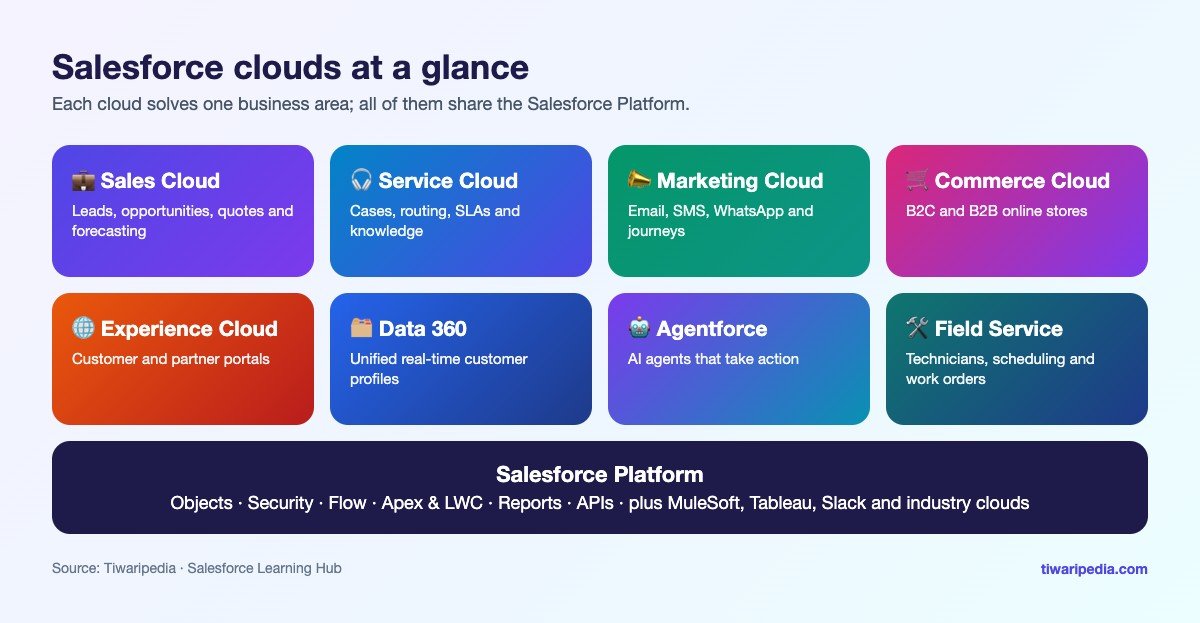
A useful way to remember the line-up: Sales wins customers, Service keeps them happy, Marketing and Commerce attract and sell to them, Experience Cloud gives them a portal, Data 360 unifies what you know about them and Agentforce puts AI to work on it.
A note on names: at Dreamforce 2025 Salesforce briefly renamed several clouds with an “Agentforce” prefix (for example “Agentforce Sales”). In September 2026 it went back to the familiar names: Sales Cloud, Service Cloud, Marketing Cloud and Commerce Cloud. Data 360 and Agentforce kept their new names. You may still see both versions in job descriptions.
1. Sales Cloud
Purpose: manage the full sales cycle, from the first enquiry to the signed deal. It is the original Salesforce product and still the most widely used.
Leads
Enquiries from websites, events or campaigns; qualified leads are converted into an account, contact and opportunity.
Accounts & contacts
Companies and the people you deal with, with full activity history.
Opportunities
Potential deals moving through stages, with amount, close date and probability.
Products, price books & quotes
What you sell, at what price, and quotes generated from the opportunity.
Forecasting
Collaborative forecasts that roll up the team’s expected revenue by period.
Territories & AI
Territory management, lead and opportunity scoring, and AI sales agents.
Who uses it: sales reps, sales managers and sales operations. Typical roles: Sales Cloud Consultant, Salesforce Admin.
2. Service Cloud
Purpose: run customer support across phone, email, chat, WhatsApp and self-service, from a single agent console.
Cases
Every complaint or request becomes a case with status, priority and full history.
Email-to-Case & Web-to-Case
Turn emails and web forms into cases automatically.
Omni-Channel routing
Send work to the right agent based on skills, capacity and availability.
Entitlements & milestones
Track service-level agreements (SLAs) such as “first response within 4 hours”.
Knowledge
Articles that agents, customers and AI agents use to answer questions.
Contact centre & messaging
Voice and digital messaging channels in the Service Console.
Who uses it: support agents, supervisors and service managers. Typical roles: Service Cloud Consultant, Contact Centre specialist.
3. Marketing Cloud
Purpose: plan, personalise and automate marketing across email, SMS, WhatsApp, mobile push and advertising.
- Marketing Cloud Engagement: B2C email and mobile campaigns with Journey Builder and Email Studio.
- Account Engagement (formerly Pardot): B2B lead nurturing, scoring and email marketing tightly linked to Sales Cloud.
- Marketing Cloud Next / Personalization: real-time personalisation powered by Data 360 and AI.
- Analytics: campaign performance and attribution.
Typical roles: Marketing Cloud Developer (AMPscript, SQL), Marketing Cloud Consultant, Email Specialist.
4. Commerce Cloud
Purpose: run online stores. B2C Commerce powers consumer websites for retail and fashion brands, while B2B Commerce lets business customers reorder, see contract prices and pay online. Order Management handles the order after checkout.
5. Experience Cloud
Purpose: build secure websites and portals connected to your Salesforce data, such as customer help centres, partner and dealer portals, and supplier or student portals. It was formerly called Community Cloud. Pages are built with drag-and-drop templates, and access is controlled with external user licences and sharing sets.
6. Data 360 (formerly Data Cloud)
Purpose: bring customer data from every source (Salesforce clouds, websites, apps, ERP systems and data warehouses) into one real-time, unified profile.
- Connect
Data streams
Ingest data from Salesforce, cloud storage, web and mobile SDKs, and other systems; “zero-copy” connectors can read from Snowflake, Databricks and Google BigQuery without moving data. - Harmonise
Data model objects
Map source fields to a standard customer data model. - Unify
Identity resolution
Match records for the same person across systems to build one profile. - Analyse
Calculated insights
Compute metrics such as lifetime value or churn risk. - Act
Segments · Activation · AI
Create audiences for marketing, trigger automation and ground Agentforce answers in trusted data.
7. Agentforce
Purpose: build and run AI agents that do real work, not just chat. An agent understands a request, decides which steps to take, and uses actions such as Flows, Apex, prompt templates and API calls to complete them, within limits you set.
Topics & instructions
Define the jobs an agent handles (for example “order status”) and the rules it must follow.
Actions
The tools an agent can use: look up an order, update a case, book an appointment.
Grounding
Answers are based on your Salesforce records, knowledge articles and Data 360.
Trust layer
The Einstein Trust Layer masks sensitive data, checks for toxic output and keeps audit trails.
Common uses include service agents that resolve routine questions, sales development agents that follow up leads, and employee agents inside Slack.
8. Field Service
Purpose: manage work done at customer sites, such as installations, repairs and inspections. It covers work orders, service appointments, scheduling and optimisation, a mobile app for technicians (with offline use), inventory in vans and customer signatures. It is popular with manufacturers, telecom, utilities and medical device companies.
9. Industry clouds
Industry clouds add data models, processes and components for a specific sector, so companies do not have to build them from scratch:
| Industry cloud | Examples of what it adds |
|---|---|
| Financial Services Cloud | Households, financial accounts, loan origination, onboarding and relationship management |
| Health Cloud | Patients, care plans, providers and care coordination |
| Manufacturing Cloud | Sales agreements, account-based forecasting and rebates |
| Automotive Cloud | Vehicles, dealers and driver relationships |
| Consumer Goods Cloud | Retail execution, store visits and trade promotions |
| Public Sector, Education, Communications, Media and Energy & Utilities clouds | Sector-specific case management, licensing, admissions, subscriptions and billing processes |
10. Platform, MuleSoft, Tableau and Slack
| Product | Role |
|---|---|
| Salesforce Platform | Build custom apps with objects, Flow, Apex and Lightning Web Components; the foundation for every cloud |
| MuleSoft | Integration and API management to connect Salesforce with SAP, Oracle, legacy systems and partners |
| Tableau | Analytics and dashboards across Salesforce and non-Salesforce data |
| Slack | Collaboration hub where teams and AI agents work with Salesforce data in channels |
| Heroku | Platform for running custom code and apps that extend Salesforce |
Comparison table: which cloud does what?
| Cloud | Main users | Key objects / tools | Popular job titles |
|---|---|---|---|
| Sales Cloud | Sales teams | Lead, Account, Opportunity, Quote, Forecast | Sales Cloud Consultant, Admin |
| Service Cloud | Support teams | Case, Entitlement, Knowledge, Omni-Channel | Service Cloud Consultant |
| Marketing Cloud | Marketers | Journeys, emails, segments | Marketing Cloud Developer / Consultant |
| Commerce Cloud | E-commerce teams | Storefronts, orders | Commerce Cloud Developer |
| Experience Cloud | Customers, partners | Sites, external users | Experience Cloud Consultant |
| Data 360 | Marketing, data and AI teams | Data streams, identity resolution, segments | Data 360 Consultant |
| Agentforce | All teams | Agents, topics, actions, Prompt Builder | Agentforce Specialist / Developer |
| Field Service | Dispatchers, technicians | Work Order, Service Appointment | Field Service Consultant |
Which cloud should you learn first?
A practical learning order for most beginners:
- Start with the Platform and Sales Cloud basics (the Administrator syllabus). Every other cloud builds on them.
- Add Service Cloud: it has steady demand from BFSI, telecom and IT services companies.
- Choose a specialisation: Marketing Cloud if you like campaigns and data, Experience Cloud for portals, or Field Service for operations.
- Learn Data 360 and Agentforce next. AI and data skills are where new projects and higher salaries are appearing.
- Developers should learn Apex, SOQL and Lightning Web Components alongside the Platform.
Test yourself: Salesforce clouds quiz
- Clouds are Salesforce’s version of modules, and all share one platform.
- Sales, Service, Marketing and Commerce Cloud are back to their original names in 2026.
- Data 360 unifies customer data; Agentforce acts on it with AI agents.
- Learn the Platform and Sales Cloud first, then specialise.
Keep learning: ☁️ Salesforce Learning Hub & combined mock test · All Salesforce guides
Salesforce, Agentforce, Sales Cloud, Service Cloud, Data 360, Slack, Tableau, MuleSoft and Trailhead are trademarks of Salesforce, Inc. Tiwaripedia is an independent learning site and is not affiliated with or endorsed by Salesforce. Product names, exam details and salaries change; check the official Salesforce and Trailhead websites for the latest information. Last updated October 2026.
Keep reading on Tiwaripedia
- Salesforce Service Cloud Interview Questions and Case Management Guide (2026)
- SAP EAM / Plant Maintenance Interview Questions & End-to-End Process Guide (S/4HANA)
- SAP S/4HANA Explained (2026): Top 10 Modules, Joule AI and the 2027 ECC Deadline
- SAP EWM Inbound Process Step by Step: ASN, Goods Receipt and Putaway Explained
- Salesforce Developer Interview Questions and Answers (2026): Apex, SOQL, Triggers, LWC and Governor Limits
- SAP PS Interview Questions for 10+ Years Experience: 100 Q&As, Process Flow & Mock Test (S/4HANA 2026)
More guides: All ERP Software articles